

1. Import into your account
View one of these free booking form templates and click on “Use template” after making sure this is what you are looking for.

Save up to 60% on yearly plans and enjoy our biggest offer of the year. Limited time only. 🍂
See pricingOnline booking forms will help you gather personal details and collect payments faster and more effectively. They are commonly used for medical appointments, salons, consultants, events, hotels, and service-based businesses.
Just tell us and get a custom template for free.
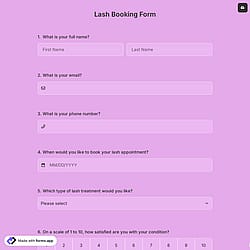
Follow the three easy steps below to easily import the template to your account, customize questions, and quickly share the form on your website or social media.

View one of these free booking form templates and click on “Use template” after making sure this is what you are looking for.

Add or remove questions through forms.app's drag-and-drop interface and play with the form design to match your brand style.

Embed it on your website in 6 different ways or share your form across all social media channels.
Just tell us how you would like a free booking form template tailored to your specific needs. forms.app’s free AI form builder will create a custom template for you in seconds.
Online booking forms are digital documents that allow people schedule appointments, reservations, or services online by selecting available dates, times, and options. They collect all essential information and necessary details in one place.
Every template you choose on this page already comes with certain similar fields. These common fields include the following:
The payment field of forms.app will help you easily collect and transfer money to your account. For collecting international payments, you can connect Stripe and PayPal accounts to your forms. No matter which method you use, it will be a quite simple process that can be completed with a few steps.
Once you add a payment field to your form, you gain access to various options. You can set a fixed amount and currency for payments, select a default payment method, and activate the payment gateways you wish to provide. Please visit the following articles to learn how to enable payment collection via Stripe or PayPal.
Using a booking form instead of manual scheduling helps you save time, reduce errors, and manage appointments more efficiently. With forms.app, people can book available time slots anytime, and all responses are collected in one organized place. This prevents double bookings, automates data collection, and creates a smoother experience for both you and your customers.
To set available dates and time slots for the customers, you can simply use the grid to show and collect them separately. Simply type and select the “Grid” option in the Form Fields search section. In the Grid’s settings, you can assign the date and time data types for each column and fill your preferred days in rows, or the other way around.
Yes, you can let respondents choose between multiple services or appointment types by adding a dropdown, multiple-choice, or product list field. Each option can represent a different service, duration, or type of appointment.
Yes, the customers can receive automatic booking confirmations. To do this, you should enable email notifications for respondents and customize them as needed.
Yes, you can easily add consent checkboxes, terms & conditions fields, or even electronic signature fields to your booking form and mark it as a required field. This lets customers explicitly agree to your policies or terms before submitting.