Save up to 60% on yearly plans and enjoy our biggest offer of the year. Limited time only. 🍂
See pricing

Typeform vs. Microsoft Forms: A detailed comparison in 2026
Summarize with
Choosing the right form builder sounds simple until you're halfway through a free trial and realize the tool has some limitations. One tool is free and already sitting in your Microsoft 365 dashboard. The other turns from form-filling into a conversation. The debate around Microsoft Forms vs Typeform isn't really about which one is "better"; it's about whether design quality and smarter logic are worth paying for when a capable free option already exists inside your existing stack.
This article breaks down both tools across pricing, design, field types, analytics, integrations, and team collaboration, so you can make the call based on your actual workflow. And if neither fits, we'll also cover a free Typeform alternative and the Microsoft Forms competitor that fills most of the gaps both tools leave open.
Short on time? Here's the clearest way to frame the decision:
Typeform | Microsoft Forms | forms.app | |
Starting paid price | $39/month | Free (M365 license) | $29/month |
AI form generation | (paid) | ||
Mobile app | |||
HIPAA compliant | (M365 plans) | ||
Multi-language forms | |||
Conditional logic | (basic) | ||
Team seats | Up to 5 (paid) | Up to 100 (M365 users) | Up to 9 (paid) |
Works outside the Microsoft ecosystem | ⚠️ Limited |
About Typeform
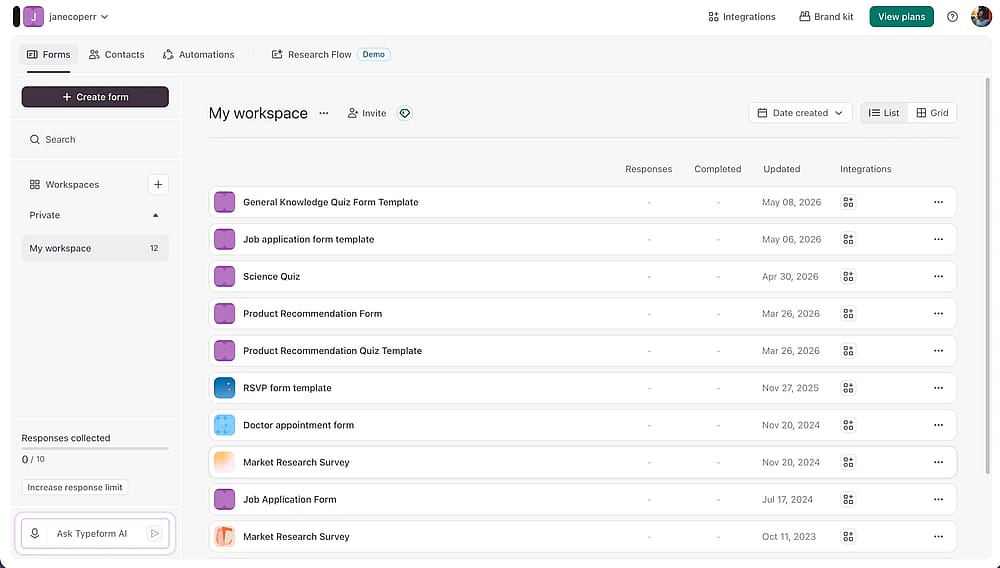
Workspace of Typeform
Typeform is an online form builder best known for its conversational forms, a one-question-at-a-time format designed to drive higher completion rates in external-facing workflows such as lead generation, customer research, and onboarding. Beyond the format, Typeform offers strong visual customization.
💡 Top use case examples:
Employee onboarding: An HR team can build a branded, multi-step form that collects personal details, equipment preferences, and signed policy acknowledgments in a single flow, using conditional logic to align with your brand and show only role-relevant questions.
Event registration: A marketing team can replace generic form tools with a conversational sign-up flow, making it feel seamless to collect data from webinar attendees while keeping completion rates high.
About Microsoft Forms
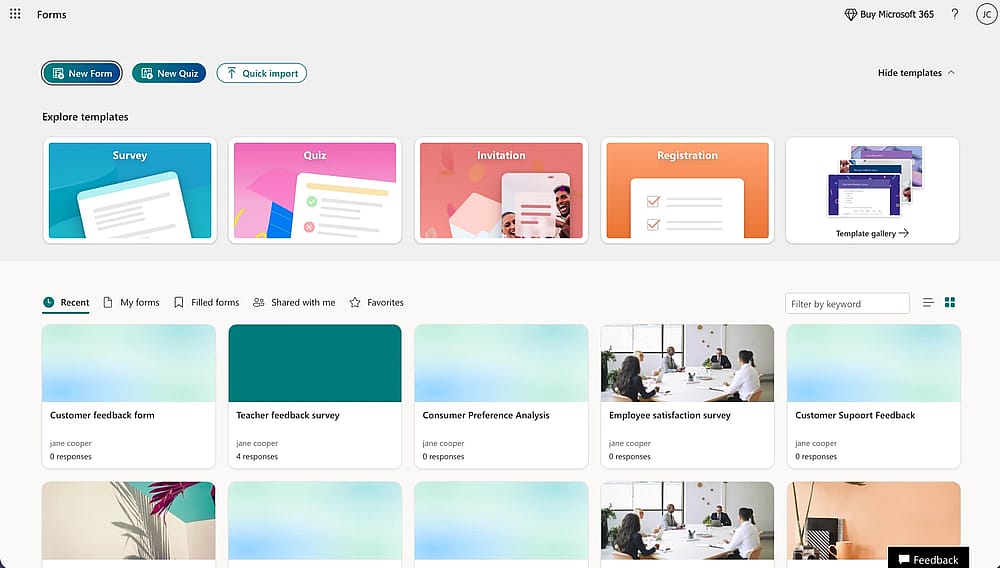
Workspace of Microsoft Forms
Microsoft Forms is a simple online form tool included with Microsoft 365, built primarily for collecting data internally, running team polls, conducting employee surveys, and administering classroom quizzes.
It doesn't compete on design or conversational forms; it competes on cost and convenience, since most organizations are already paying for the Microsoft ecosystem it lives in. The features included are sufficient for internal use, but teams running external lead generation or anything design-sensitive will quickly feel the limitations.
💡 Top use case examples:
Employee pulse surveys: An HR team can embed a form directly into Teams, using built-in form tools for collecting data from the whole company, with results auto-populating in Excel instantly.
Internal event registration: An office manager can spin up a quick sign-up form that's easy to match your brand with basic theming, getting responses from colleagues without any extra software or cost.
Typeform vs. Microsoft Forms: Head-to-head comparison
From pricing Typeform plans to design flexibility and integrations, both Typeform and Microsoft Forms cover the essentials of online form building. However, the real differences become obvious when you compare them side by side. Here’s a closer look at how they perform across the seven categories that matter most:
1. Pricing
Typeform pricing starts at $39/month for the basic plan, which covers 100 responses and 1 user; higher tiers unlock more responses, more seats, and features such as file uploads, advanced analytics, and priority customer support. The business plans go up to $129/month, with features included, scaling accordingly. There's a free plan, but at 10 responses per month, it's only useful for testing, not running anything live.
Individuals | Teams | ||||
Free | Basic | Plus | Business | Talent | Growth Flow |
0 USD/mo | 39 USD/mo | 79 USD/mo | 129 USD/mo | 169 USD/mo | 379 USD/mo |
Typeform's free plan sounds appealing, but 10 responses/month makes it unusable for any live campaign. Most teams end up on the Basic plan at $39/month almost immediately.
Microsoft Forms pricing depends on which Microsoft account you have. The free personal tier is capped at 200 responses per form. Once you hit that limit, the form stops collecting responses entirely. Paid personal plans come along with advanced features like Power Automate, file uploads, and Copilot AI.
Free (Personal Microsoft Account) | Microsoft 365 Personal | Microsoft 365 Family | Microsoft 365 Premium |
|---|---|---|---|
0 USD/mo | 9.99 USD/mo | 12.99 USD/mo | 19.99 USD/mo |
💡For organizations already paying for Microsoft 365 Business, Microsoft Forms is effectively free and far more capable than the personal tier suggests.
2. Ease of use & Form creation
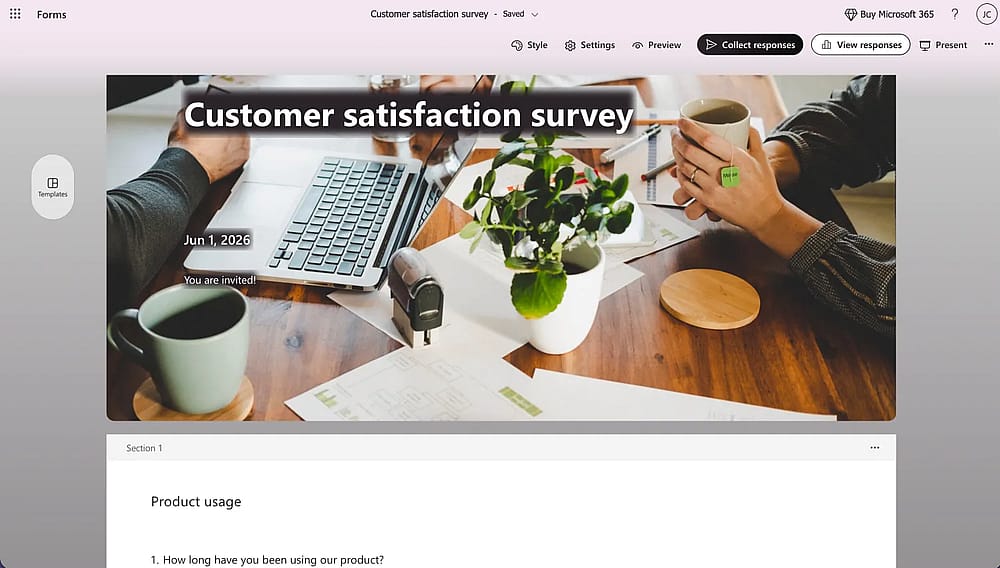
Form builder section of the Microsoft Forms tool
Both tools are easy to pick up, but in different ways. Microsoft Forms feels instantly familiar; if you've used any Microsoft Office product, you're already comfortable with it. No onboarding, no setup, just start building.
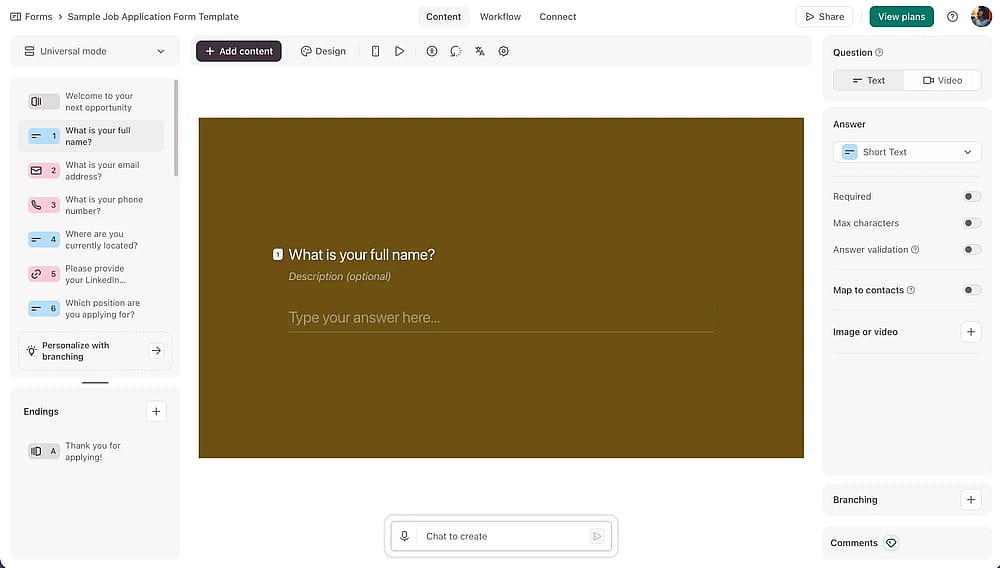
Form builder section of the Typeform tool
Typeform's builder is more polished but more opinionated; it's built around the conversational format, so working outside that structure takes slightly more effort.
User review on Typeform:
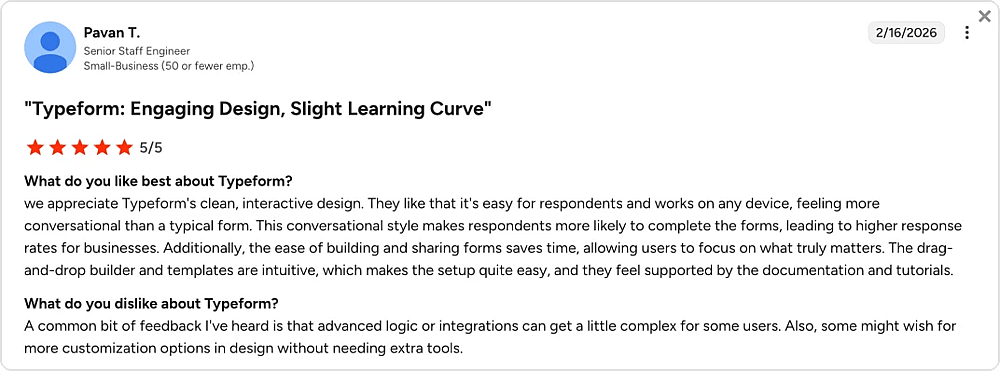
A user review about Typeform from G2
Source: G2
For teams switching from Google Forms, Microsoft Forms will feel like a natural, zero-friction move. For teams that want more control over the form experience, Typeform's learning curve is short and worth it.
3. Design & Customization
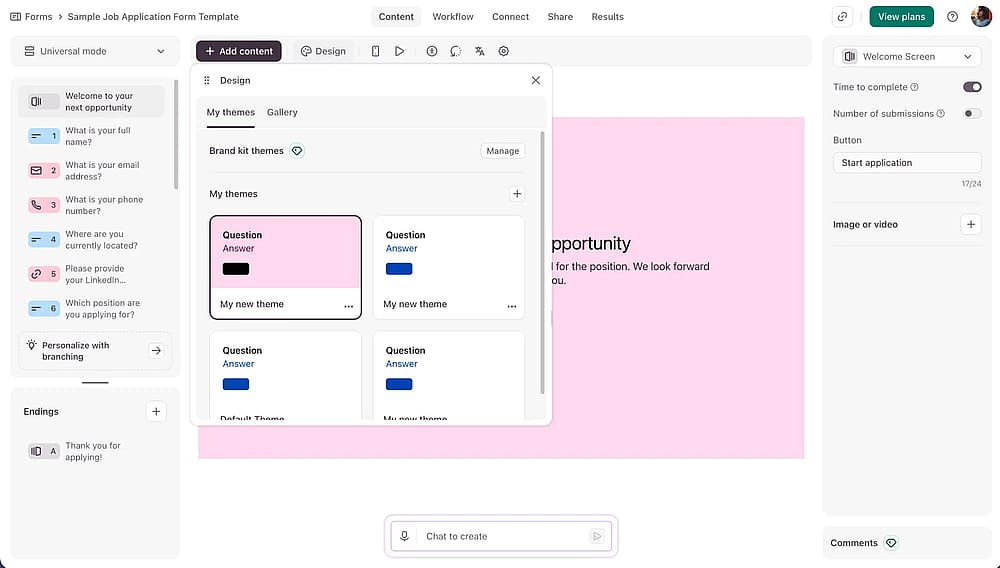
Form designer section of the Typeform tool
This is the sharpest gap between the two tools. Typeform offers brand kits, custom fonts, animated backgrounds, and an integrated photo library, enough visual control to make a form feel like a natural extension of your product or website.
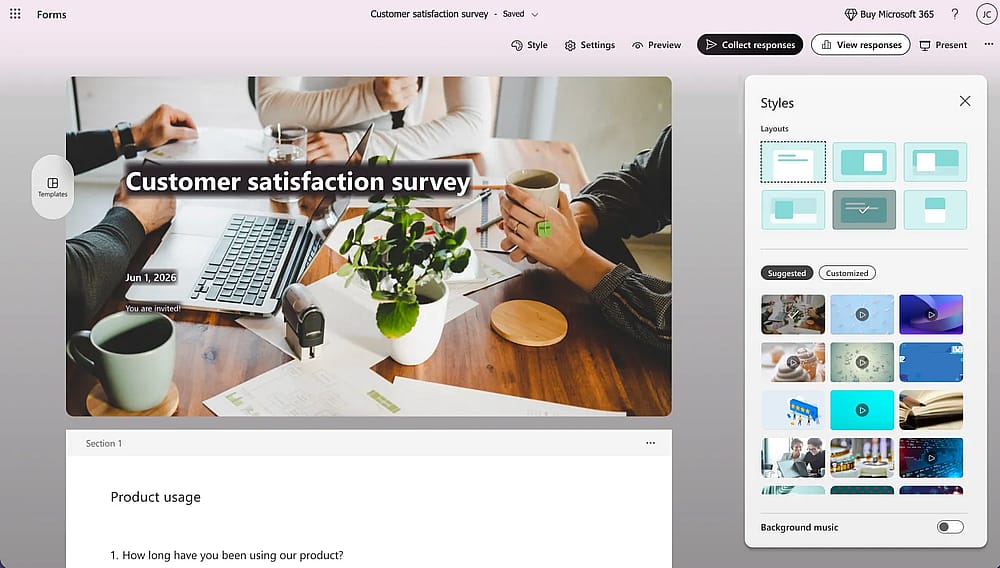
‘Style’ section of the Microsoft Forms tool
Microsoft Forms gives you a basic theme picker with a handful of color options, background images, and the background music feature. Functional, but not designed to impress.
Microsoft Forms' design options are limited to preset themes. If consistent branding across customer-facing touchpoints matters to your team, it will fall short quickly.
4. Field Types & Features
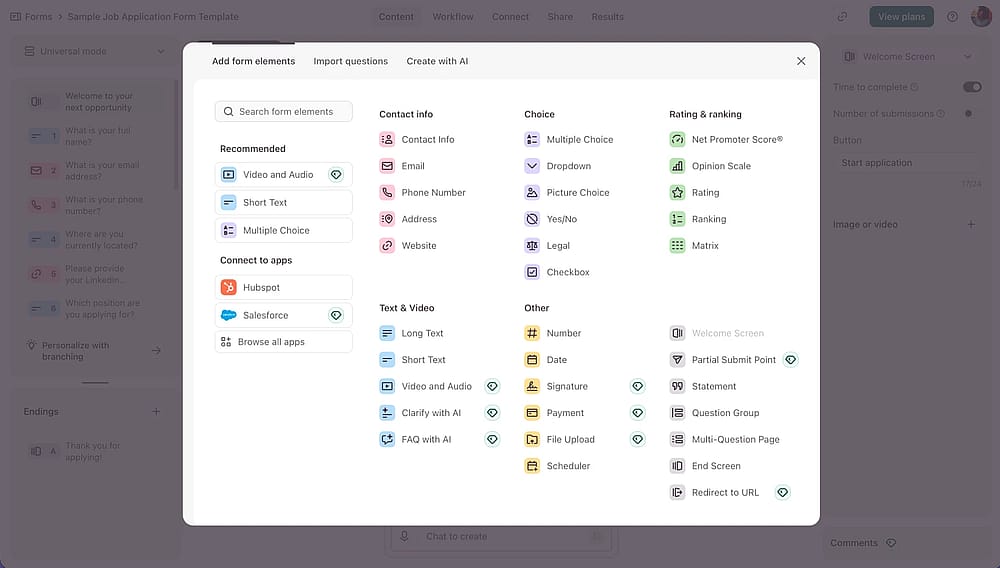
Options of the form fields you can add with Typeform
Typeform offers 20+ field types, including file uploads, payment fields, and rating scales, plus conditional logic, answer piping, hidden fields, and pre-fill.
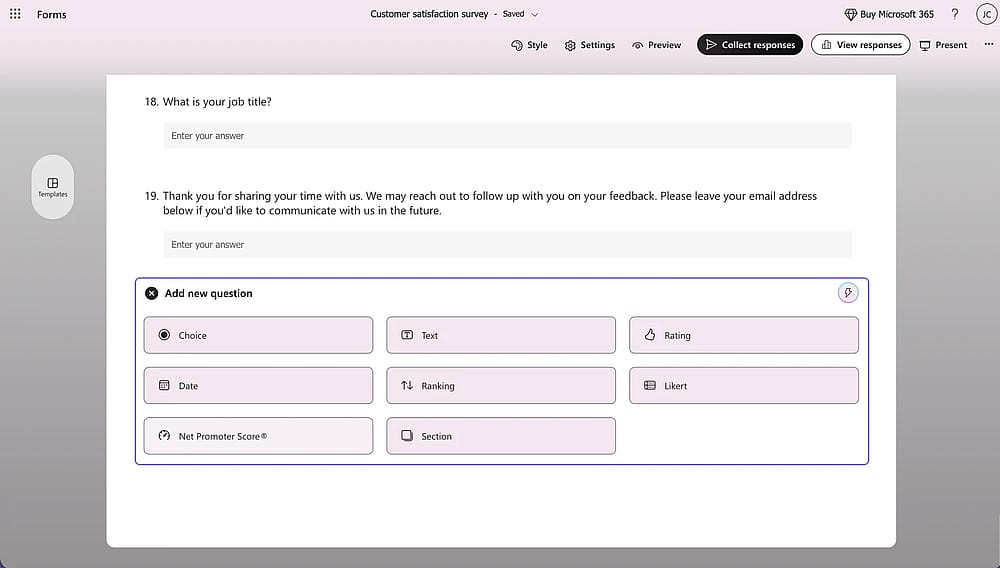
Options of the form fields you can add with the Microsoft Forms
Microsoft Forms covers around 10 core types: multiple choice, text, rating, date, ranking, Likert, and file uploads (paid tier only). Branching logic is available, but basic compared to Typeform's Logic Jumps.
File uploads in Microsoft Forms are only available on Business/Enterprise plans. If you need respondents to attach documents or images, the free and personal tiers won't cover it.
5. Analytics & Reporting
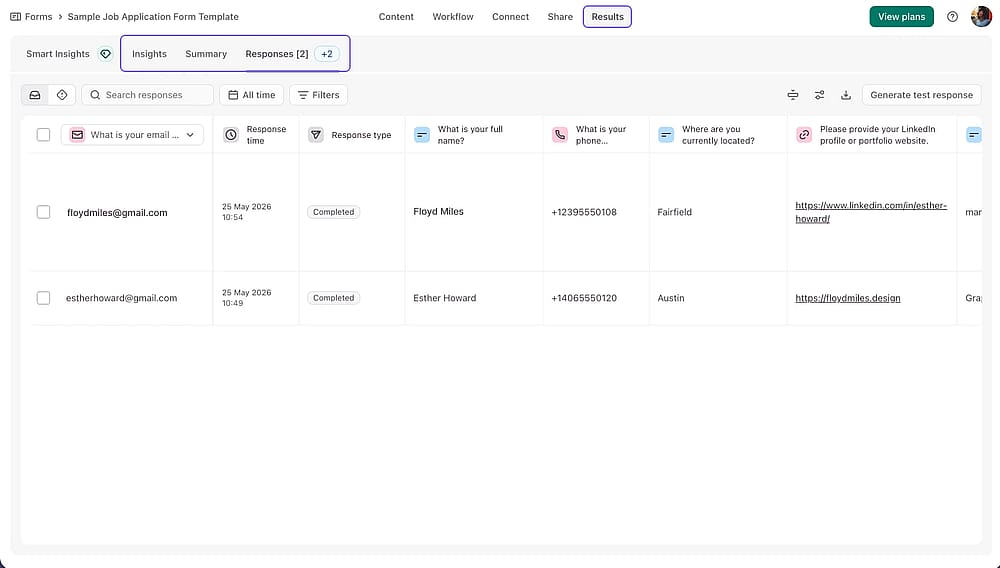
The ‘Results’ section of the Typeform tool
Typeform offers real-time response tracking, per-question drop-off analytics, and AI-powered Smart insights that automatically surface trends in open-ended answers.
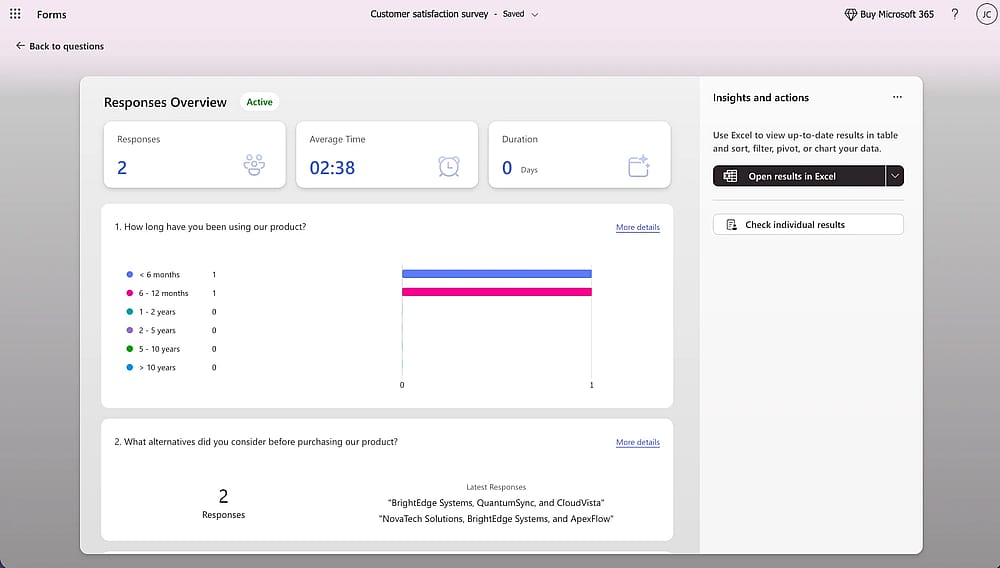
The ‘View responses’ section of the Microsoft Forms tool
Microsoft Forms shows basic summary charts and response counts, with one genuine advantage: a single-click live sync to Excel that auto-updates as new responses come in, and a strong native integration for teams already working in spreadsheets.
6. Integrations
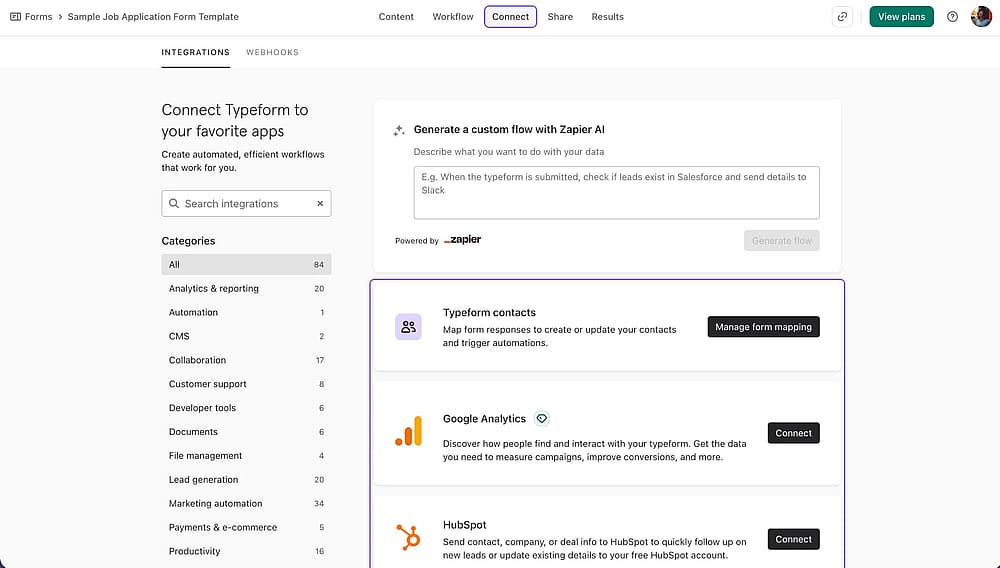
The ‘Connect’ section of the Typeform tool
Typeform connects natively with 120+ tools, including HubSpot, Salesforce, Mailchimp, Slack, and WordPress, making it the stronger option for teams with mixed or marketing-heavy stacks.
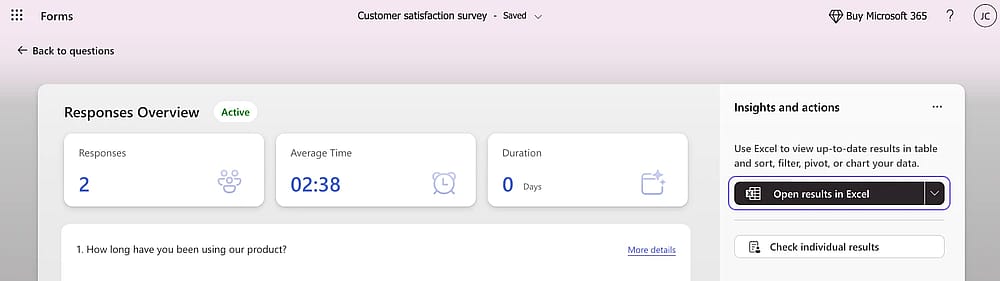
The ‘Excel export’ button of the Microsoft Forms tool
Microsoft Forms, meanwhile, integrates deeply within the Microsoft ecosystem but relies almost entirely on Power Automate to reach anything outside it.
💡 For organizations fully committed to Microsoft 365, the native integrations with Teams, SharePoint, and Power BI are genuinely powerful and require no additional configuration.
User review on Microsoft Forms:
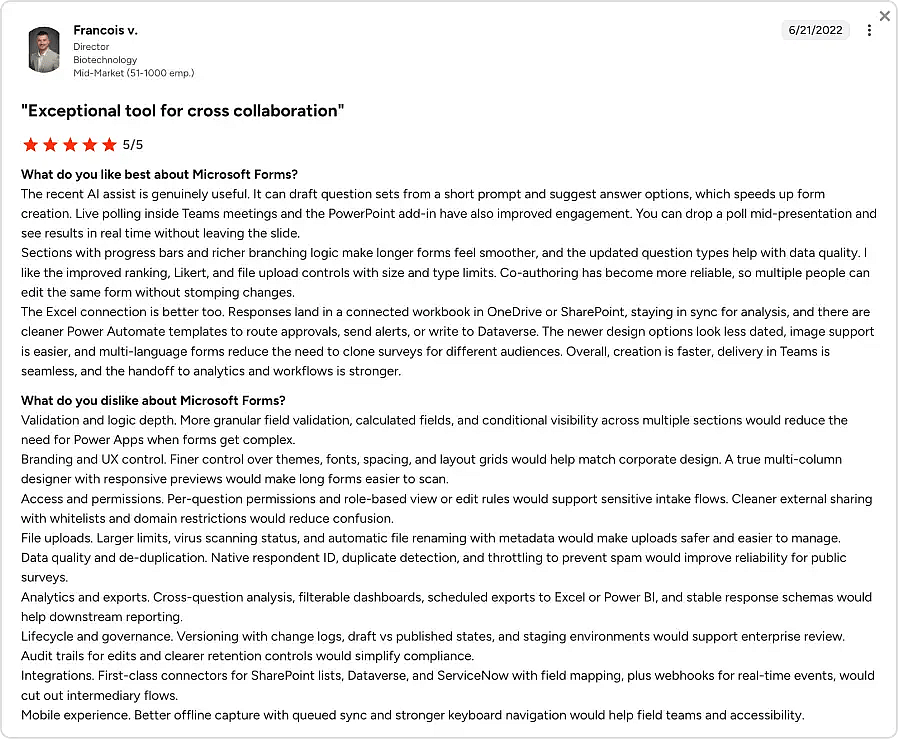
A user review about Microsoft Forms from G2
Source: G2
7. Team collaboration
Typeform gates collaboration by plan: 1 seat on Basic, 3 on Plus, 5 on Business, meaning adding team members comes at a real cost as you scale.
Microsoft Forms takes the opposite approach, offering co-authors from within your organization on any Microsoft 365 plan, with forms shareable and editable like any other Office document through Teams or SharePoint.
An alternative worth trying: forms.app
If neither Typeform nor Microsoft Forms fully fits your workflow, forms.app is an alternative to both, worth putting on your shortlist. It closes most of the gaps both tools leave open, at a lower price point, with a free plan that's actually usable for real campaigns:
🤖 AI form tools
forms.app comes with an AI Form Generator, AI Survey Tool, and AI Quiz Maker built in, no paid plan required to access any of them.
💳 Payment fields
forms.app lets you collect payments directly inside your form through native Stripe and PayPal integrations, no third-party checkout needed.
💡 A freelance consultant can add a payment field to their onboarding form, so a new client fills out their project brief and pays the deposit in a single step.
📊 Auto-scoring
Score responses automatically and display custom result messages at the end of a form, available on the free plan. Useful for quizzes, assessments, and lead qualification flows.
📉 Drop-off tracking & partial submissions
forms.app tracks exactly where users abandon your form and captures incomplete submissions, so no response data is ever lost. You can use drop-off data over time to identify and fix the questions that hurt completion rates.
A SaaS team running a product feedback survey can see that 40% of users drop off at question six, and cut it, without ever having to guess why completion rates are low.
Conclusion
Typeform and Microsoft Forms serve genuinely different needs, and that's the clearest takeaway from this comparison. If your team lives inside Microsoft 365, Microsoft Forms is a capable, zero-friction option that handles internal workflows well. If design quality and completion rates matter more than cost, Typeform is the stronger choice for external-facing forms.
The right pick comes down to your stack, your budget, and who's filling out your forms. If neither tool matches all of those factors, forms.app is worth a look as a middle-ground option before committing to either.
Frequently Asked Questions (FAQs)
Yes, but with limitations. On the builder side, connecting Microsoft Forms to non-Microsoft tools like HubSpot, Notion, or Airtable typically requires Power Automate, which adds setup complexity and may require a paid plan.
For teams whose stack lives mostly outside Microsoft 365, the friction adds up quickly, and a dedicated Microsoft Forms alternative will almost always be the more practical choice.
Microsoft Forms handles quizzes well with built-in auto-grading and instant feedback on every plan. Typeform goes further with its dedicated Knowledge Quiz Mode, wrapping assessments in a conversational format that drives higher completion, though advanced quiz features are locked behind higher paid tiers.
If you need a free alternative with more flexibility, forms.app's Calculator feature lets you score responses, run real-time calculations, and show custom result messages, all on the free plan.
Contributors
Researched & written by
forms.app, your free form builder
- Unlimited responses
- Unlimited questions
- Unlimited team members