Typeform vs. Fillout: Features, pricing & best alternative
Summarize with
Typeform and Fillout are two of the more popular form builders on the market right now, and it's easy to see why people end up comparing them. Teams usually compare these two after outgrowing Google Forms or looking for better response experiences.
If design quality, analytics, and advanced customization matter most, Typeform will likely feel like the stronger option. If pricing flexibility, higher response limits, and simpler workflows matter more, Fillout becomes the more practical choice.
This comparison breaks down Fillout vs Typeform across pricing, question types, customization options, template library, integrations, and customer support, so you can make the call based on your workflow, not just a feature checklist.
TL;DR: Short on time? Here's what you need to know before diving in:
Typeform is the better pick for design and analytics, but the free plan caps at 10 responses per month, and paid plans start at $39/month. Fillout offers more for free, up to 1,000 responses, and is easier to get started with, but focuses more on simplicity than advanced analytics and AI features.
Typeform | Fillout | forms.app | |
Starting paid price | $39/month | $19/month | $29/month |
AI form generation | |||
Mobile app | |||
HIPAA compliant | |||
Multi-language forms | |||
Conditional logic | |||
Team seats | Up to 5 (paid) | Unlimited (all plans) | Up to 9 (paid) |
* as of May 2026
About Typeform
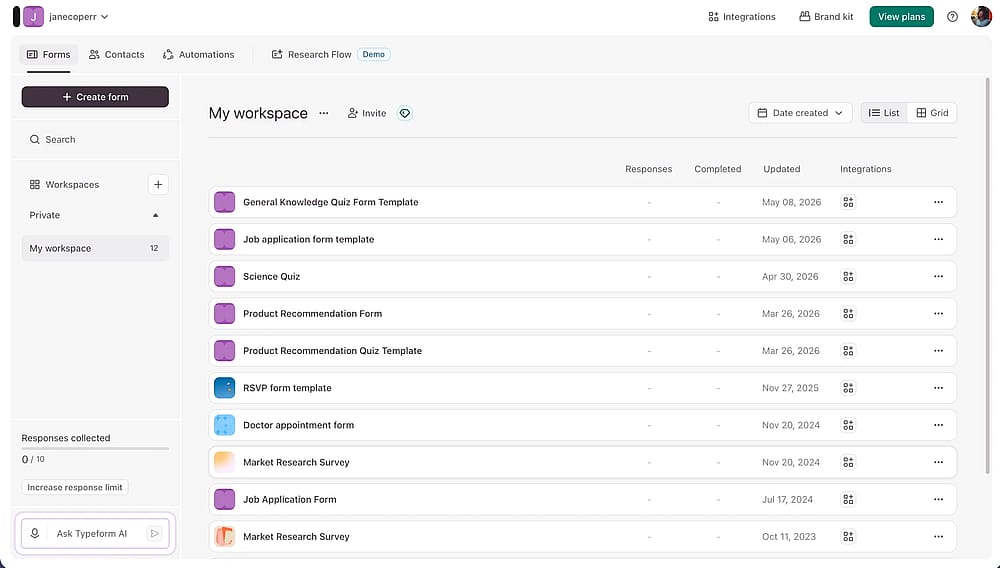
Workspace of Typeform
Typeform is an online form builder known for its conversational forms, a one-question-at-a-time format designed to feel more like a dialogue than a data entry exercise. It's a popular choice for customer feedback surveys, lead generation forms, quizzes, and job applications, largely because the conversational format can feel more engaging than traditional forms.
💡 Top use case examples:
Lead qualification: A high-end agency can use "Logic Jumps" to ask different questions based on a lead’s budget, automatically sending high-value leads directly into native integration tools.
Post-purchase feedback: A fashion retailer can track exactly which question causes customers to stop filling out a survey using drop-off analytics to optimize the form.
About Fillout
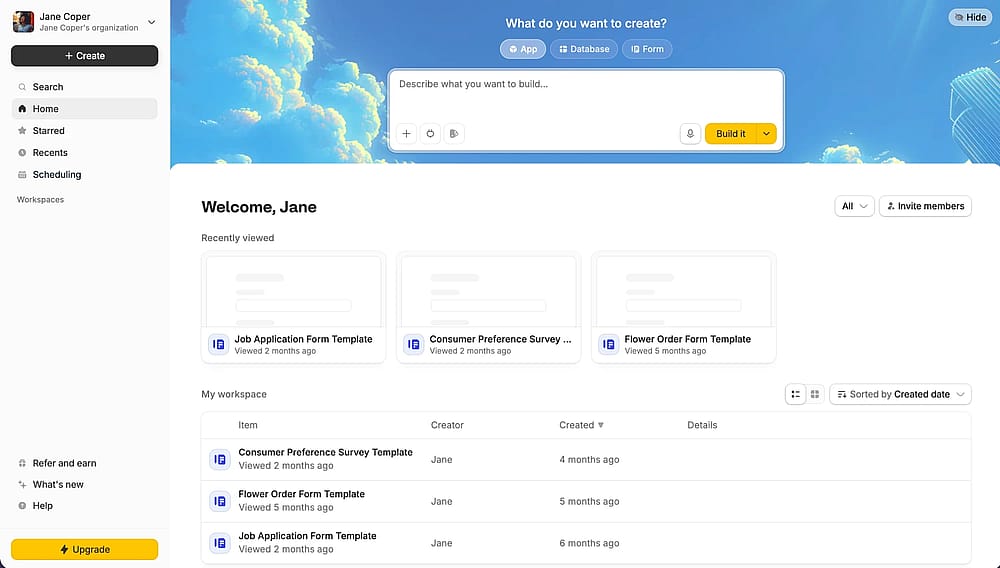
Workspace of Fillout
Fillout is a form builder that prioritizes simplicity and value, making it easy to create capable online forms without needing much setup or onboarding time. It covers the core use cases well and adds some less common functionality like PDF generation, appointment scheduling, and multi-language forms that give it an edge in specific scenarios.
💡 Top use case examples:
Service bookings: A local consultant can use the appointment scheduling field to let clients pick a time slot and register for a meeting in one single step.
Global event registration: A conference organizer can use multi-language support to allow attendees to toggle between Spanish, French, and English on the same form.
Fillout vs Typeform: Head-to-head comparison (7 categories)
Both tools cover the form-building basics well, but the differences become clear once you look at pricing structure, design depth, and how each platform handles analytics and team collaboration. Here's how they stack up across the seven areas that matter most when making a decision:
1. Pricing
Typeform pricing starts at $39/month for the Basic plan, which covers 100 responses per month and one user. From there, pricing Typeform scales to $79/month (Plus) and $129/month (Business), with response caps and seat limits increasing at each tier. The free plan is functional but restrictive; 10 responses per month is barely enough to test a form, let alone run one actively.
💡 Response limits matter more than they might seem at first glance. A webinar registration form or a lead-generation campaign can easily receive 10 responses within a few days. For any active use case, hitting that ceiling isn't an edge case; it's almost inevitable.
Individuals | Teams | ||||
Free | Basic | Plus | Business | Talent | Growth Flow |
0 USD/mo | 39 USD/mo | 79 USD/mo | 129 USD/mo | 169 USD/mo | 379 USD/mo |
Fillout pricing is more accessible: the free plan allows 1,000 responses per month, and paid plans start at $19/month. For teams on a budget, Fillout has a clear edge here.
Free | Starter | Pro | Business |
|---|---|---|---|
0 USD/mo | 19 USD/mo | 49 USD/mo | 89 USD/mo |
Typeform's free plan is more limited than it looks. The free plan allows only 10 responses per month. That's enough to explore the builder, but not to run any real campaign. Most teams will likely need at least the Basic plan for ongoing usage.
2. Ease of use & form creation
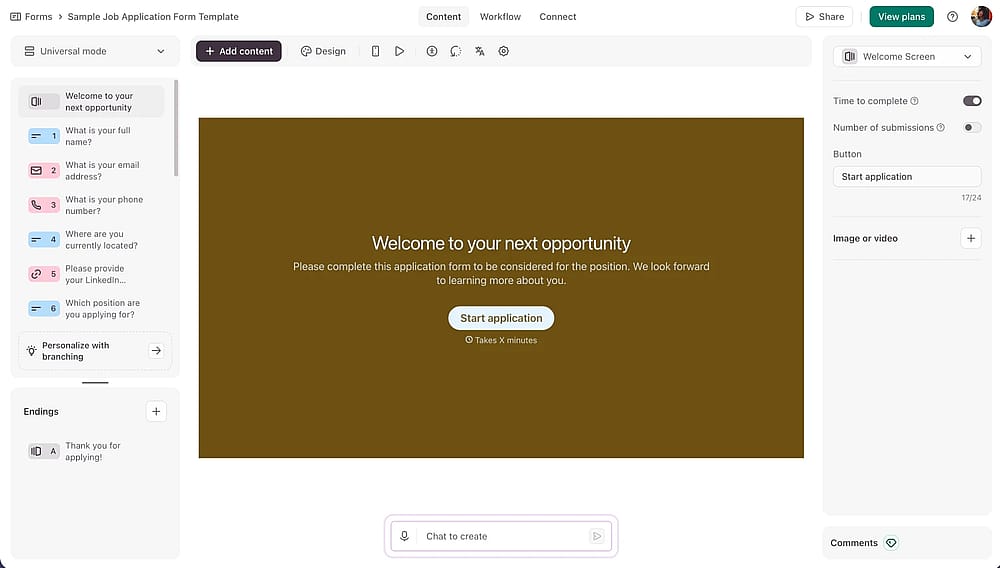
Form builder section of the Typeform tool
Both tools use a drag-and-drop builder and are genuinely easy to pick up. Typeform's editor is polished but opinionated; it's built around the conversational format, so working outside that structure takes more effort.
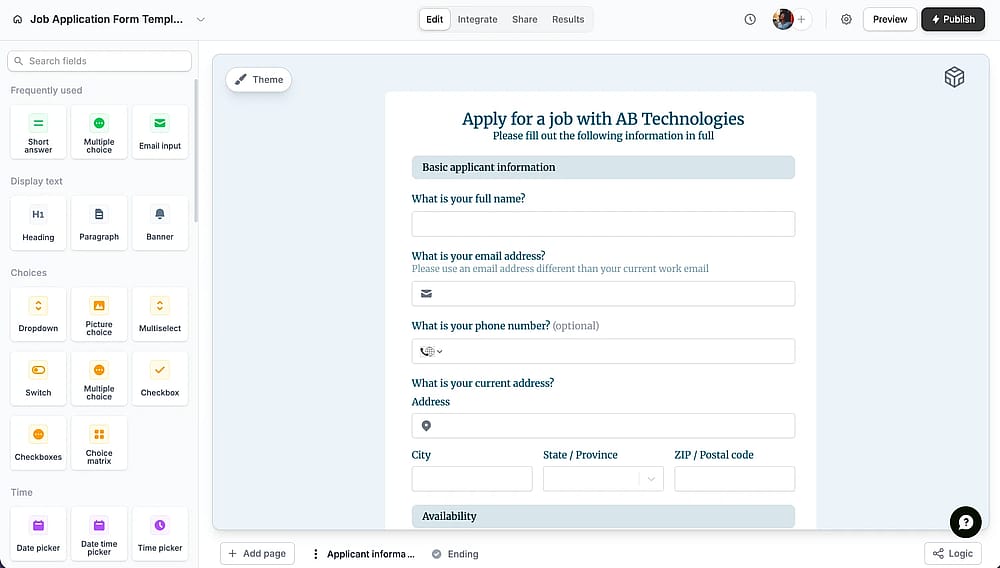
Form builder section of the Fillout tool
Fillout is more flexible out of the box, letting you switch between layouts without friction.
3. Design & customization
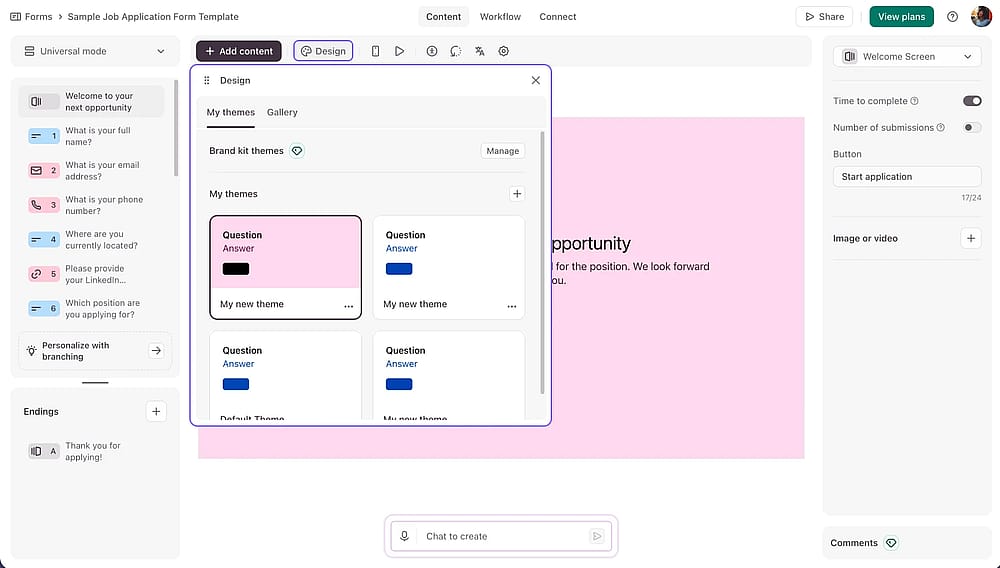
Form designer section of the Typeform tool
This is where Typeform pulls ahead. The platform offers brand kits, custom fonts, animated backgrounds, and access to integrated photo and icon libraries, all without leaving the builder. Typeform offers a more refined design experience than most competitors, including Fillout, which covers the basics (logos, colors, themes, custom CSS) but doesn't match the same level of visual polish.
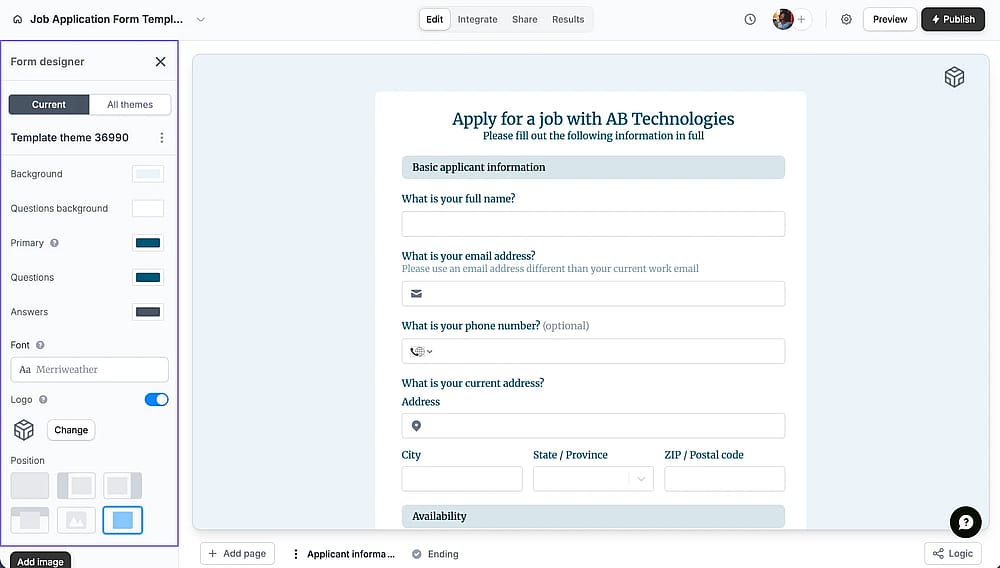
Form designer section of the Fillout tool
💡 If you're switching from Google Forms, Fillout will feel like a more natural upgrade, with a similar layout logic, but with more customization and integrations, especially for teams moving away from Google Forms but not ready for enterprise pricing.
4. Field types & features
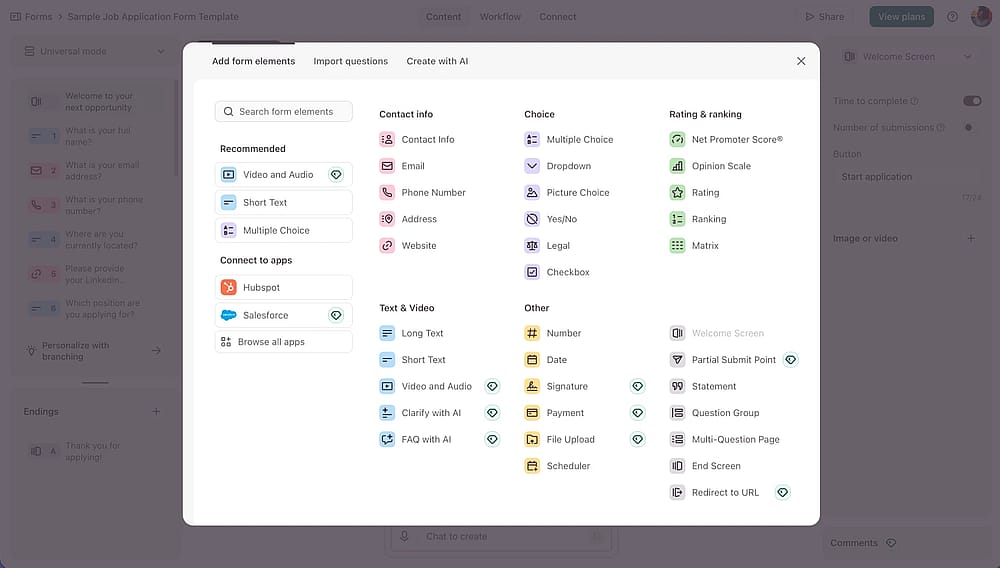
Options of the form fields you can add with Typeform
Typeform offers around 20+ question types, including file uploads, payment fields, and video questions.
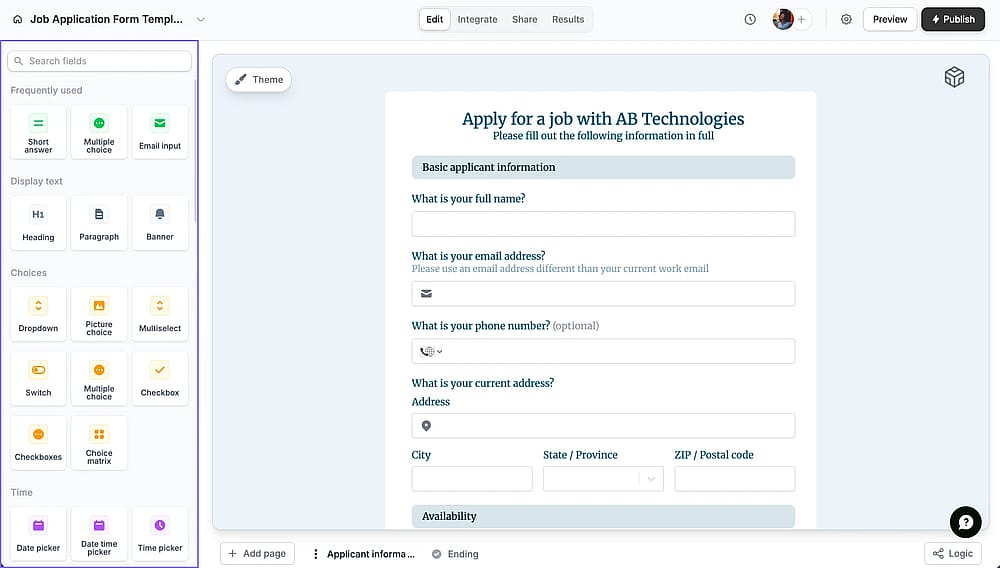
Options of the form fields you can add with Fillout
Fillout covers a similar range and adds a few practical extras like scheduling and PDF generation from form responses. Both support conditional logic, e-signatures, and pre-filled fields. Both tools cover most modern form-building needs, though Fillout offers a few additional workflow-focused features.
5. Analytics & reporting
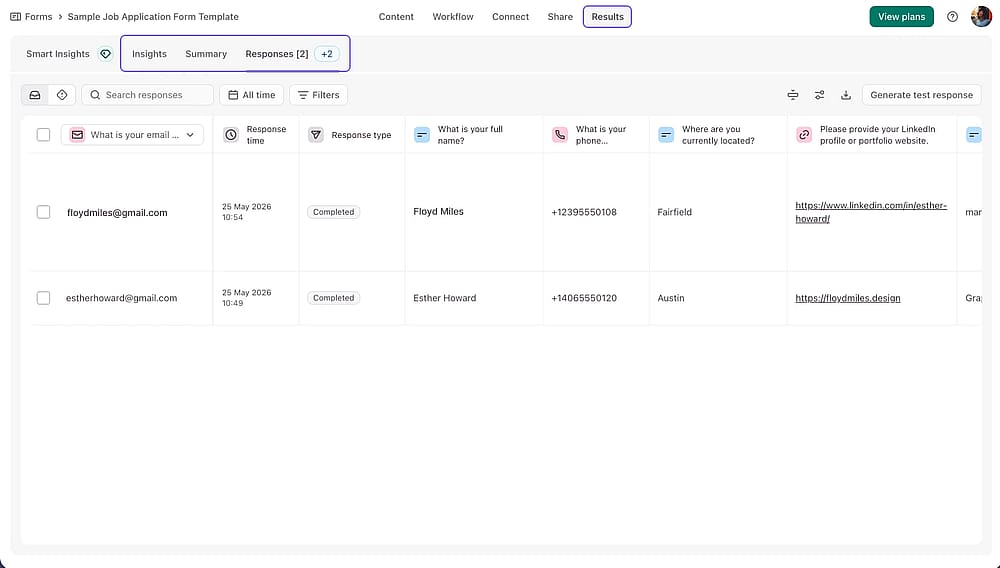
The ‘Results’ section of the Typeform tool
Both tools offer real-time response tracking and drop-off analysis, which puts them closer together on analytics than most comparisons suggest. Typeform goes further with AI-powered smart insights that automatically surface trends from open-ended answers, plus deeper visualizations that make it easier to act on data quickly.
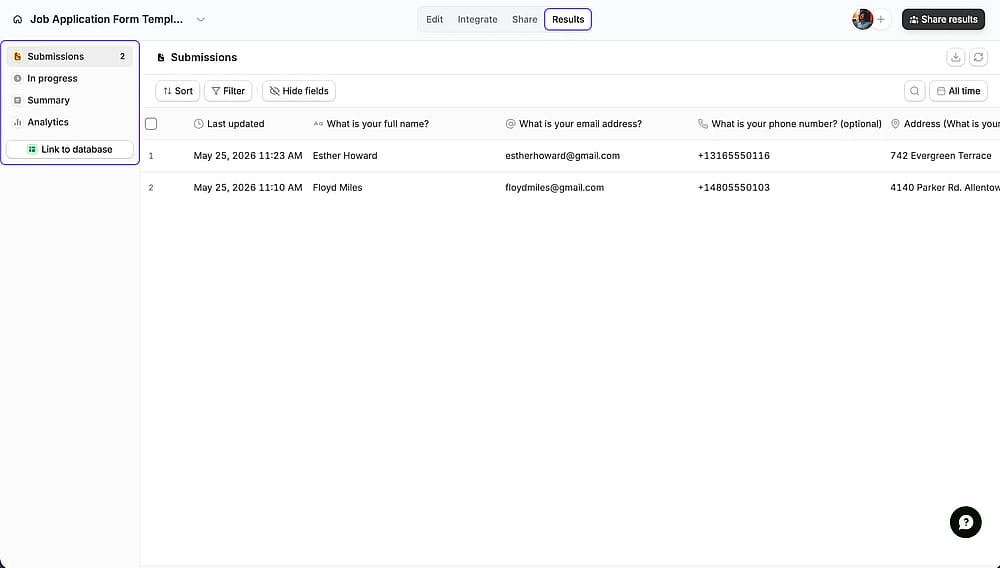
The ‘Results’ section of the Fillout tool
Fillout covers the essentials well, including drop-off tracking and real-time notifications, but stops short of the more advanced reporting features Typeform offers on higher plans. For most teams, Fillout's analytics will be sufficient. For those who rely heavily on form performance data, Typeform has the edge.
It’s also worth noting that regarding Fillout, checking drop-off information is available on the Business plan and above.
6. Integrations
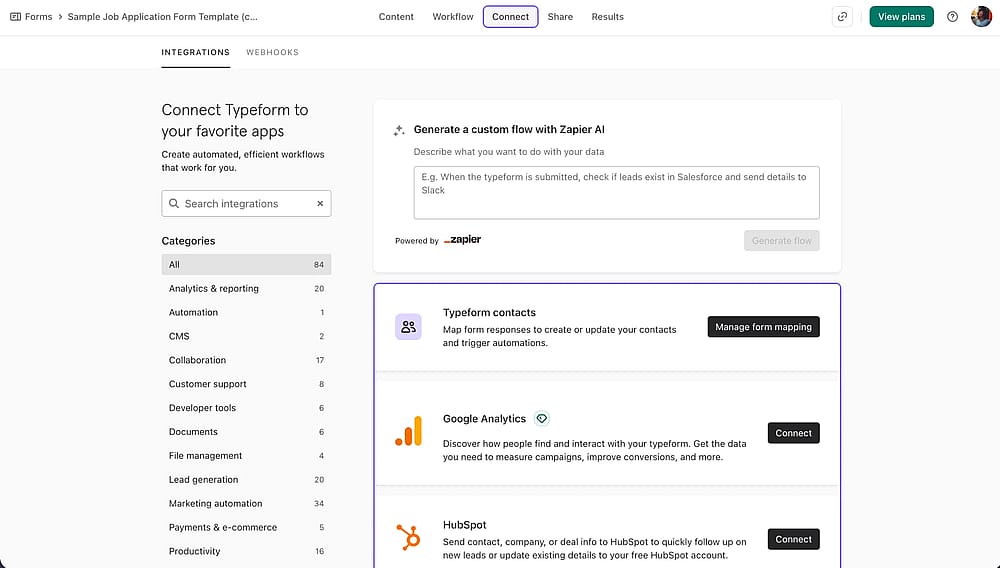
The ‘Connect’ section of the Typeform tool
Typeform connects natively with 120+ tools, including WordPress, HubSpot, Salesforce, Slack, and Mailchimp.
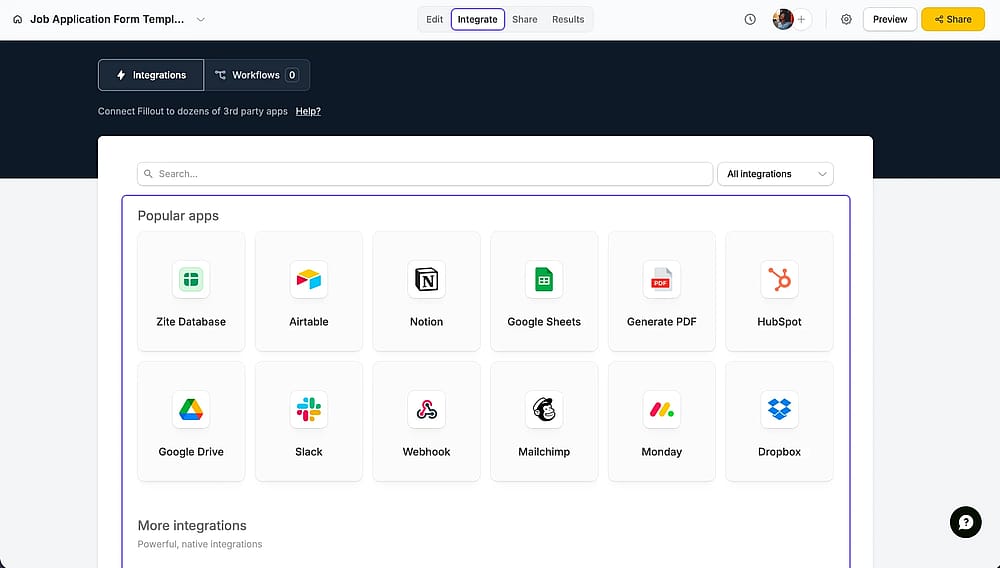
The ‘Integrate’ section of the Fillout tool
Fillout covers the most common integrations, Google Sheets, Airtable, Notion, and HubSpot, and relies more heavily on Zapier to fill the gaps. For teams with a complex tech stack, Typeform's native integration depth is a real advantage.
7. Team collaboration & business plans
Both tools limit collaboration based on plan tier. Typeform's business plans allow up to 5 team members on the $129/month plan, with lower tiers supporting 1–3 users.
Fillout takes the opposite approach: unlimited team members are included on every plan, including the free one. Collaboration is structured around Workspaces and granular permissions. Additionally, you can organize forms by client or department and control exactly who can edit forms versus who can only view responses.
Fillout's most useful collaboration features are on higher plans. While seats are unlimited across all plans, features like form analytics, abandoned form tracking, custom domains, and priority customer support are only available on the paid plans.
A stronger alternative: forms.app
If neither Typeform nor Fillout fully fits your needs, forms.app is one of the most capable free Typeform alternatives on the market right now. It fills most of the gaps both tools leave open, and does it at a lower price point, with a more generous free plan than most Typeform alternative options you'll come across.
🤖 Smart AI tools
forms.app includes an AI Form Generator, AI Survey Tool, and AI Quiz Maker, none of which require a paid plan to access.
💡 Use case: Useful for spinning up customer feedback surveys mid-campaign, generating internal research forms quickly, or creating lead qualification quizzes without starting from scratch.
📲 Mobile app
forms.app has a dedicated mobile app on both Google Play and the App Store. You and your team can build and manage forms on the go from different devices.
30+ free field types
forms.app offers over 30 field types, including unique options like Products, Drawing Field, and Field Groups. All of these and other advanced features are available on the free plan for anyone who needs more flexibility in form design without paying for it.
📊 Auto-scoring
Automatically calculate scores based on responses and display custom messages at the end, available on the free plan. Useful for quizzes, assessments, and lead qualification forms.
📉 Drop-off tracking & partial submissions
forms.app lets you track exactly where users abandon your form and capture partial responses, so you never lose data from an incomplete submission. You can also monitor drop-offs to optimize your forms over time.
Conclusion
Typeform and Fillout are both solid tools, but they're built for different priorities. Typeform wins on design, analytics, and integrations. If those matter most and the price is justified, it's hard to beat. Fillout wins on value, team flexibility, unlimited seats, a generous free plan, and practical features like scheduling, making it the smarter pick for budget-conscious teams.
If neither tool fully matches your workflow or budget expectations, forms.app is another option worth considering. A free plan that actually works, 30+ field types, AI tools, and a mobile app, it covers most of what Typeform and Fillout charge extra for, without asking you to choose between features and affordability.
Frequently asked questions (FAQs)
Typeform is the best fit for teams where form design and brand experience matter, marketers, agencies, and product teams running customer feedback surveys, lead generation campaigns, or user research. Just be prepared for the pricing jump once you need more responses or team seats.
Fillout is generally the better fit for small businesses, mainly because of its pricing model. Unlimited team seats on all plans means you're not paying extra just to collaborate. For small teams that need capable online forms without a growing monthly bill, Fillout is the more practical starting point.
That said, if budget allows and design quality is a priority, forms.app offers a strong middle ground with a more generous feature set at a competitive price.
Yes, but with significant limitations. The free plan caps at 10 responses per month and one active form, enough to test the builder, but not enough for any real-world usage. Most teams end up needing at least the Basic plan at $39/month.
It depends on what you need. Fillout is better on price, team collaboration, and free plan generosity. Typeform is better in terms of design, analytics depth, and native integrations. Neither is objectively superior; the right choice depends on your priorities.
Yes, Fillout supports payment collection through integrations with tools like Stripe. Payments are typically handled by connecting Stripe via Fillout's integrations, allowing respondents to pay during or after form submission.
However, PayPal isn't supported directly inside Fillout forms; if PayPal is required, you'd need to redirect users to a PayPal payment page outside the form flow.
Contributors
Researched & written by
forms.app, your free form builder
- Unlimited responses
- Unlimited questions
- Unlimited team members