
How to build an online trivia quiz in 2026 (the easy, proven way)
Summarize with
After designing and hosting hundreds of digital events, I’ve learned exactly what separates a dull questionnaire from a viral, high-energy game. Whether you are building a corporate team-building exercise, a marketing lead magnet, or just a fun weekend activity with friends, you don't need a massive budget or coding skills to create a trivia quiz that hooks your audience from the very first question.
The secret lies in choosing the right tools and structuring the game for maximum engagement. This guide shares firsthand insights from testing nearly every online trivia game maker on the market, revealing how to leverage a modern trivia game maker to craft compelling questions and set up seamless automated scoring. You will also discover how to create a trivia quiz online for free without hitting annoying, hidden paywalls halfway through a project.
Step 1: Define your audience & goal
Before opening an online trivia game maker, you need a blueprint. The biggest mistake creators make is building a quiz they find interesting, rather than one tailored to the people playing it.
Different groups require entirely different engagement strategies:
- Corporate teams: Focus on morale and connection. Use team-based scoring and general pop culture. Avoid hyper-niche topics that exclude players.
- Marketing & Leads: Keep it under 7 questions to prevent drop-offs. Ensure the topic ties directly to your brand or industry.
- Social gatherings: Go deep into specific fandoms, inside jokes, and high-stakes competitive scoring.
Step 2: Choosing the right online trivia game maker
With your blueprint ready, you need a platform that handles the heavy lifting automatically. Using forms.app as your trivia maker allows you to manage automated scoring, multimedia, and custom results without touching a line of code.
Why forms.app works perfectly for online trivia
forms.app’s quiz maker easily adapts whether you are launching a real-time challenge or a casual link shared on social media:
- Automated scoring: Using the Calculator feature under the Logic tab, you can assign custom point values to every correct answer in seconds.
- Dynamic question types: Keep engagement high by moving beyond plain text. You can easily insert picture-selection or multiple-choice questions, drag-and-drop ranking fields, and fill-in-the-blank layouts.
- Custom success pages: Instead of a generic thank-you note, you can design unique ending pages that dynamically switch based on the player's final score (e.g., a "Trivia Master" badge for high scores).
How to make your own trivia for free (the fast way)
The quickest route to a live game is using a pre-made template:
1. Select a template: Choose a trivia layout from the template library and click "Use Template."
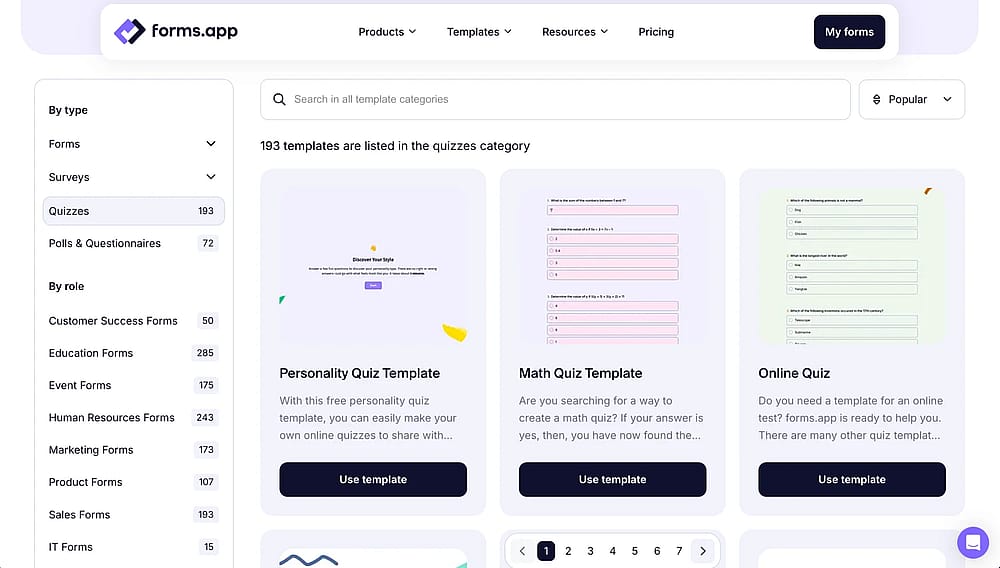
Choose a ready trivia template
2. Customize your content: Use the drag-and-drop builder to rewrite questions, update choices, and change colors.
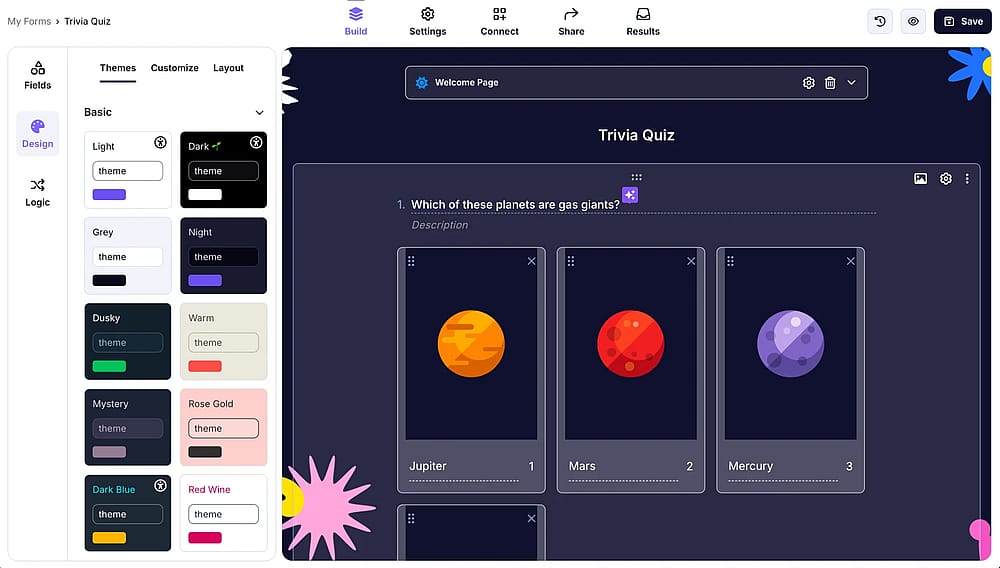
Change the design of your trivia
3. Share instantly: Grab your custom link or QR code to share across WhatsApp, Slack, and social media, or embed the quiz directly onto your website.
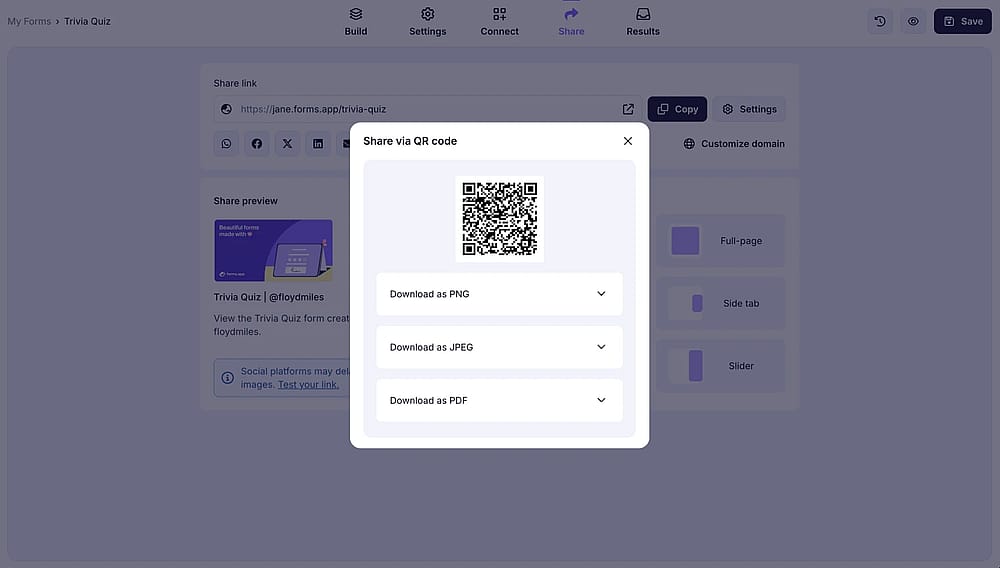
Share your trivia
💡 Expert tip: Sharing your trivia via a QR code is the best way to bridge the gap between physical and digital spaces, allowing in-person audiences to instantly scan, join, and start playing on their mobile devices in seconds.
Step 3: Crafting high-engagement quiz questions
💡 Expert tip: Hit the "sweet spot" length. Online attention spans are short. If a game drags, players drop out.
The best trivia isn't an academic exam; it’s an entertainment experience. To keep players hooked from start to finish, use these three proven strategies:
1. The 70/30 difficulty rule
- 70% accessible: Add questions that are guessable by the majority to keep momentum high and prevent frustration.
- 30% tough: Sprinkle in a few difficult brain-teasers to challenge the leaders and separate the scoreboard.
- Pacing: Start easy to build player confidence, then ramp up the difficulty toward the end.
2. Mix your formats
Avoid multiple-choice fatigue by switching up your question types:
- Visuals: Use Picture Selection fields for a "Name that Logo" or "Guess the Movie" round.
- Ordering: Use ranking fields to make players drag events into the correct chronological order.
- Text input: Remove the multiple-choice safety net for the final question, forcing players to type the exact answer.
3. Share "Fun Facts"
Don't just show the correct answer. Use the success or explanation screens to share a quick, surprising fact. It keeps the game rewarding even for players who guessed wrong.
💡 Expert tip: An explanation field is ideal for this. It works like a text paragraph placed directly below a question block.
Step 4: Setting up the logistics & scoring
The tech and questions are ready, so the final step is defining how the game runs. Smooth logistics and clear scoring keep the competitive energy high and prevent player confusion.
1. Automate scoring via the calculator
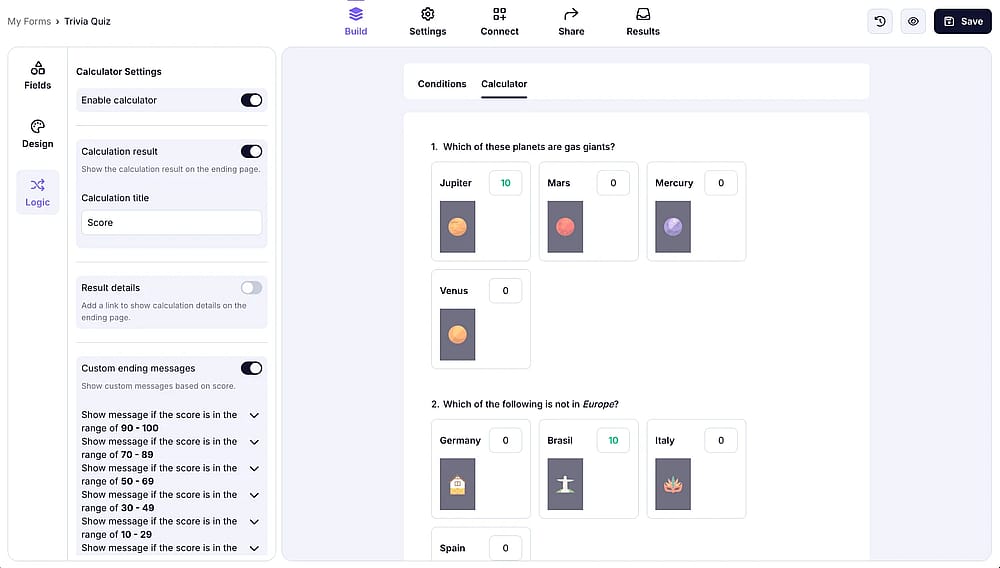
Score each of your trivia questions carefully
Manually tallying points kills the game's momentum. Instead, use forms.app’s Calculator feature to handle it instantly:
- Assign consistent point values (e.g., 10 points per correct answer).
- Show the total score on the final custom success page so players get immediate feedback.
forms.app’s free plan allows using advanced features like conditional logic or a calculator.
2. Clear instructions first
Before players answer the first question, use an introductory page to state the rules clearly. Let them know how many questions to expect, how scoring works, and that they only get one submission attempt.
💡 Expert tip: Sharing your trivia via a QR code is the best way to bridge the gap between physical and digital spaces, allowing in-person audiences to instantly scan, join, and start playing on their mobile devices in seconds.
3 common trivia pitfalls to avoid
Even with the best tools, a few overlooked details can completely derail a player's experience. Based on years of hosting digital events, watch out for these three common traps:
1. Clunky, text-heavy questions
Writing long, narrative paragraphs for a single question destroys the fast pace of trivia. Players lose focus when they have to read a wall of text on their mobile screens.
🔧 The fix: Keep questions to a single, punchy sentence. If you need to add context, use the Explanation Field after they submit their answer, not before.
2. Ambiguous wording (The "Debate Trap")
If a question has multiple technically correct answers or a confusing double-negative, your players will stop enjoying the game and start arguing over the rules.
🔧 The fix: Be incredibly precise. Instead of asking "When did the Titanic sink?", ask "In what year did the Titanic sink?" Always have a friend proofread your questions to spot accidental double meanings.
3. Forgetting the mobile test
Most of your audience will open your quiz link on their smartphones. If your font sizes are too small, your images are unoptimized, or your answer buttons are packed too closely together, mobile players will accidentally misclick or drop out.
🔧 The fix: Before sending the final link to your audience, open the quiz preview on your own phone. Make sure visual fields like Picture Selection display cleanly and that buttons are easy to tap on a small screen.
Conclusion
Creating an online trivia quiz doesn't require complex coding or a massive budget.
It just takes the right strategy and a user-friendly tool. By defining your audience, keeping your questions punchy, and leveraging forms.app to automate scoring and multimedia delivery, you can launch a seamless game in minutes. Choose a template, inject your unique content, and share your custom link or QR code to watch your engagement soar.
Frequently asked questions (FAQs)
For an optimal digital experience, the sweet spot is 10 to 15 questions. This keeps the entire game within a crisp 15-to-20-minute window. If a quiz stretches beyond 20 questions, mobile attention spans drop significantly, causing players to abandon the form before reaching your final success page.
Absolutely. Once your quiz is ready in forms.app, you don't have to just rely on a standard link. You can choose from multiple embed options, such as a full-page embed, a seamless inline block, or a pop-up layout, and paste the automatically generated iFrame code directly into your website's HTML or CMS builder.
Yes. Trivia is one of the highest-converting lead magnets available. Simply add an "Email" field at either the very beginning or right before the final success page. This allows you to naturally build your email marketing list while players are highly engaged with your game.
- June 2026 - Article revised and updated to align with 2026 standards
- June 2026 - FAQ section added
- June 2026 - Visuals updated
- June 2026 - Content reviewed by an editor and expert tips added
Contributors
Researched & written by
forms.app, your free form builder
- Unlimited views
- Unlimited questions
- Unlimited notifications
Related articles
75+ Best Halloween quiz questions & answers