Save up to 60% on yearly plans and enjoy our biggest offer of the year. Limited time only. 🍂
See pricing

What is a client intake form? Types, questions & templates

Summarize with
Whether you run a law firm, a fitness studio, or a freelance design business, the way you collect information from clients at the start sets the tone for everything that follows.
A well-designed online intake form replaces scattered emails with a single, structured step. As more professional service providers move their client intake process online, form builders have made it easier than ever to create polished, effective forms without any technical background.
In this guide, you'll find a clear client intake form definition, a breakdown of which industries rely on them most, the essential form fields to include, 10 form types with example questions, all in one place.
TL;DR
A client intake form is a questionnaire used to collect key information from clients before a service begins.
Who uses them:
1. Healthcare providers
2. Legal and financial professionals
3. Marketing agencies and consultants
4. Fitness, wellness, and beauty services
Essential fields to include:
1. Contact details
2. Reason for inquiry
3. Relevant background
4. Service preferences
5. Consent and disclosure
What is a client intake form, who uses it, and what should it include?
A new client intake form is a survey form used to gather client information before a service begins. It is typically the first step of the onboarding process, and when done right, it saves time for both sides, structured form to collect everything you need upfront. Instead of manual data entry after every new inquiry, responses flow directly into your system the moment a client submits the form.
Almost any service-based business relies on client intake forms, including:
- Healthcare providers — to collect medical history and insurance details before appointments
- Law firms — to gather case background and urgency before the first consultation
- Marketing agencies — to ask about budgets, competitors, and goals before proposing a strategy
- Fitness trainers, estheticians, and counselors — to screen clients and prepare before the work begins
- Financial advisors — to gather income details, investment goals, and outstanding debts before mapping out a financial or tax strategy
- Real estate agents — to pre-screen buyers and renters on their budget, desired neighborhoods, before showing homes
- IT consultants — to audit a client's current tech stack, security protocols, user count, and core pain points
The fields you include will depend on your industry, but the core should stay lean. Most forms to collect client information effectively cover:
Form field | What it captures |
|---|---|
Contact details | Name, email, phone number, and address |
Reason for inquiry | What the client needs and why they reached out |
Background information | Medical history, project goals, or financial situation |
Service preferences | Which services are they interested in |
Timeline and budget | Deadlines and financial expectations |
Communication preferences | How and when the client prefers to be contacted |
Consent and disclosures | Privacy acknowledgments and compliance checkboxes |
💡 Practical tip: For industries that require documentation, a file upload field is also worth adding so clients can attach relevant records upfront.
10 client intake form types (with example questions)
There are hundreds of client intake form templates and types out there, but most fall into a handful of industries. Below are the 10 most commonly used, each with a brief description and example questions to help you get started:
1. General client intake form
The starting point for any new client relationship. A client intake form collects basic contact details, service needs, and preferences, giving you enough context to personalize the experience from day one.
💡 Question examples:
What service are you looking for?
What is your preferred method of contact?
2. Real estate client intake form
Helps agents collect buyer or seller preferences, budget, and timeline expectations upfront, saving time and improving planning before the first property viewing.
💡 Question examples:
Are you buying or selling a property?
What is your target budget or listing price?
3. Digital marketing client intake form
A marketing intake form is filled out before a campaign begins. This form gathers budget, target audience, business objectives, and competitor insights. A sample client intake form for agencies typically also includes questions about previous campaigns and existing brand assets.
💡 Question examples:
What are your main marketing goals for the next 6 months?
Who is your target audience?
4. Tax preparation client intake form
Collects everything a tax professional needs to file an accurate return, from taxpayer details to supporting documents. A proper tax client intake form example eliminates the need for multiple follow-up emails during a busy filing season.
💡 Question examples:
What is your filing status this year?
Have there been any major financial changes since last year?
5. Medical/patient intake form
Used to collect a patient's medical history, current symptoms, and insurance information before an appointment. Patient intake form templates typically also include emergency contact fields and sections for current medications.
💡 Question examples:
Do you have any known allergies or existing conditions?
What medications are you currently taking?
6. Fitness client intake form
Helps trainers understand a client's current fitness level, health background, and goals before designing a training plan. Goes beyond contact details to cover injury history, lifestyle habits, and workout preferences.
💡 Question examples:
What are your main fitness goals?
Do you have any injuries or physical limitations we should know about?
7. Esthetician client intake form
Collects a client's current skincare routine, skin concerns, and any allergies before a treatment. Many estheticians pair this with a consent form, which can be built directly into the same intake form template.
💡 Question examples:
What are your main skin concerns right now?
Do you have any known allergies to skincare ingredients?
8. Spa client intake form
Collects treatment goals, preferences, and relevant medical background to ensure each session is both safe and personalized. A spa sample client intake form typically also covers contraindications and confidential health details.
💡 Question examples:
Are there any areas of the body you'd like us to avoid?
Do you have any medical conditions that may affect your treatment?
9. Law firm client intake form
Identifies the legal matter, parties involved, key dates, and client goals before the first consultation. Intake form templates for legal professionals also typically include fields for urgency level and existing legal representation.
💡 Question examples:
Can you briefly describe your legal matter?
Are there any upcoming deadlines or court dates we should know about?
10. Counseling client intake form
The counseling intake form covers personal history, current concerns, previous therapy experience, and emergency contacts, giving the counselor a fuller picture before the first session begins.
💡 Question examples:
Have you previously worked with a therapist or counselor?
Is there anything specific you'd like to focus on in our sessions?
How to create a client intake form with an online form builder?
Creating a client intake form with forms.app takes just a few minutes. The drag-and-drop builder is user-friendly enough for anyone to use, no technical background needed.
1. Log in and choose how to start

Access the sign-up page and start creating your form
Sign up in seconds or log in via Google, Microsoft, or Apple. From there, pick one of the ready-made client intake form templates, generate a form with AI by describing what you need, or build from scratch. The template library is the fastest starting point for most users.
2. Customize your form fields
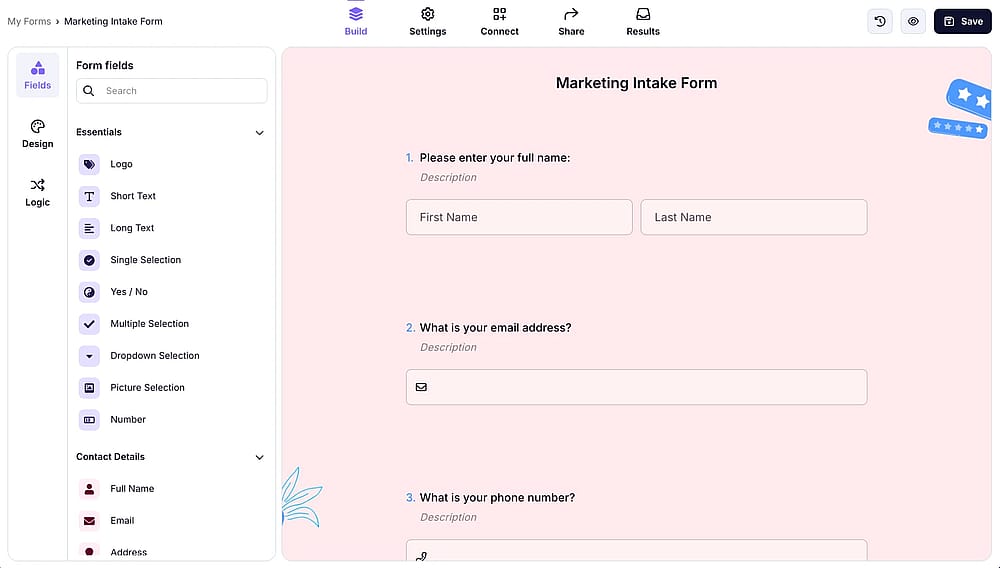
Once you open your form, edit the fields and adjust settings
Use the drag and drop editor to add, remove, or reorder fields. You can include contact details, file uploads, rating scales, date pickers, legal consent checkboxes, and more. To keep your form short and focused, use conditional logic to show or hide fields based on previous answers.
💡 Practical tip: Enable conditional logic for fields like "Describe your legal matter" or "List your current medications"; these should only appear for the right respondents, not everyone.
3. Share or embed your form
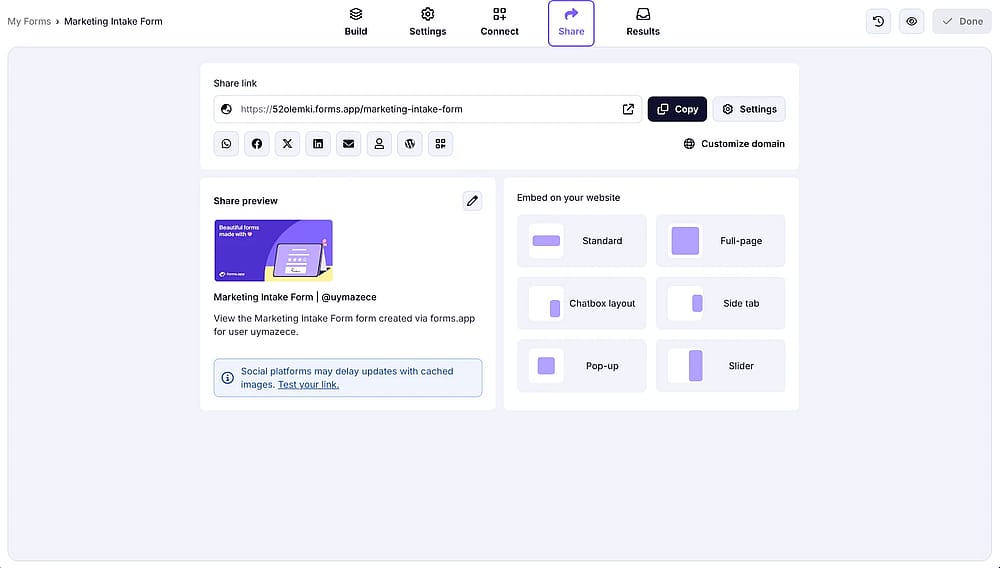
Go to the ‘Share’ tab to explore the sharing options
Share via a direct link, embed it on your website, or distribute it across social media. You can set privacy levels to public, restricted, or private depending on your needs.
4. Review your responses
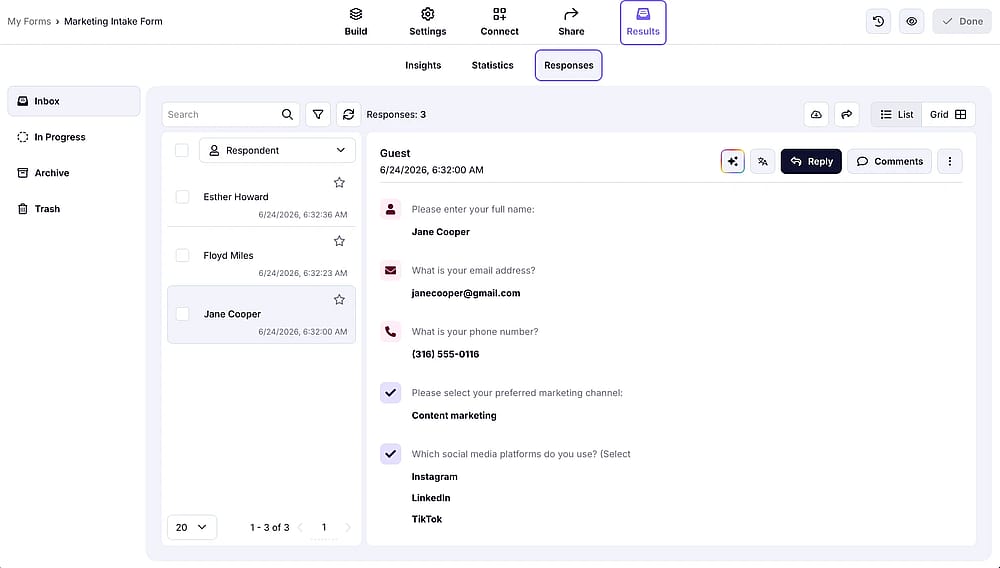
To check your responses and manage them, navigate to the ‘Results’ tab
Head to the Results section to analyze submissions, track completion rates, and export data for your records.
💡 forms.app tracks exactly where users abandon your form and captures partial submissions, so you can identify which fields hurt completion rates and fix them over time.
The bottom line
A client intake form is one of the simplest tools you can put in place to make your onboarding process faster, more professional, and more consistent, regardless of your industry. When built well, it replaces guesswork with clarity and sets the right expectations before you've even had your first conversation.
Frequently Asked Questions (FAQs)
A contact form collects just enough information to start a conversation, usually a name, email, and a short message. A client intake form goes deeper, gathering the background, preferences, and context you need to actually deliver a service.
Before the first appointment, call, or project kickoff, ideally at least 24 hours in advance, so you have time to review their responses and prepare accordingly.
As short as possible while still covering what you need. A good rule of thumb is under 10 fields for general inquiries, with conditional logic handling anything more specific.
Yes, forms.app lets you add a Terms and Conditions field directly to your form. You can display the legal text as a pop-up within the form, or redirect clients to an external page where the full terms are hosted, useful for healthcare, legal, and any other professional service that requires consent before submission.
- June 2026 - Definition and types sections reviewed and updated
- June 2026 - FAQ section added
- June 2026 - Visuals updated
- June 2026 - Client intake form creation steps updated
Contributors
Researched & written by
forms.app, your free form builder
- Unlimited responses
- Unlimited questions
- Unlimited team members