Save up to 60% on yearly plans and enjoy our biggest offer of the year. Limited time only. 🍂
See pricing

Typeform vs. 123FormBuilder: A detailed comparison in 2026
Summarize with
Picking the right form builder isn't always a clean decision. Typeform and 123FormBuilder both handle the core job of data collecting, but they're built around completely different priorities. One turns form building into a conversation, another takes the opposite approach, less flair, more function.
The 123FormBuilder vs. Typeform debate usually comes down to one question: do you need your forms to look and feel premium, or do you need them to handle compliance and payment workflows that other tools can't? This article breaks both down across pricing, design, field types, integrations, and team features. And if neither fits, we'll also cover a 123FormBuilder and Typeform alternative that closes most of the gaps both tools leave open.
💡 All tools featured in this content have been reviewed and updated for 2026 standards. Pricing reflects the most current monthly options available.
Short on time? Here's the comparison table:
Typeform | 123FormBuilder | forms.app | |
Starting paid price | $39/month | $37/month | $29/month |
AI form generation | |||
Mobile app | |||
HIPAA compliance | (Enterprise) | ||
Multi-language forms | |||
Conditional logic | |||
Team seats | Up to 5 (paid) | Up to 10 (paid) |
(Free & unlimited) |
Conversational UX (Step view) |
About Typeform
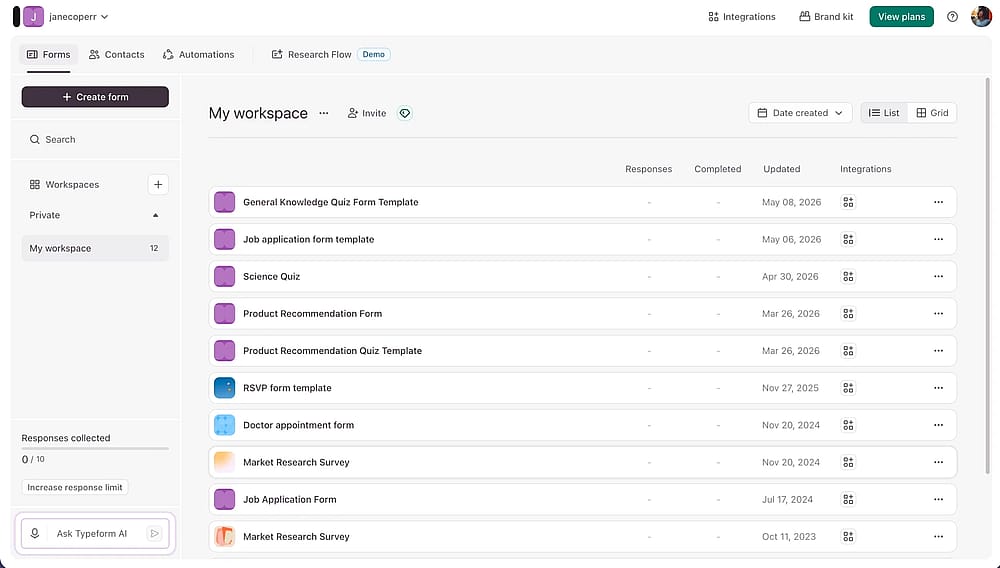
Workspace of Typeform
Typeform is an online form builder best known for its conversational, one-question-at-a-time format, a design choice that consistently drives higher completion rates on external-facing workflows. It also gives teams strong visual customization, making it easy to create forms that feel like a natural extension of your brand rather than a generic survey.
💡 Use case example: A SaaS team can build a branded onboarding sequence with conditional logic that shows only role-relevant questions, collecting everything they need in a single, polished flow.
About 123FormBuilder
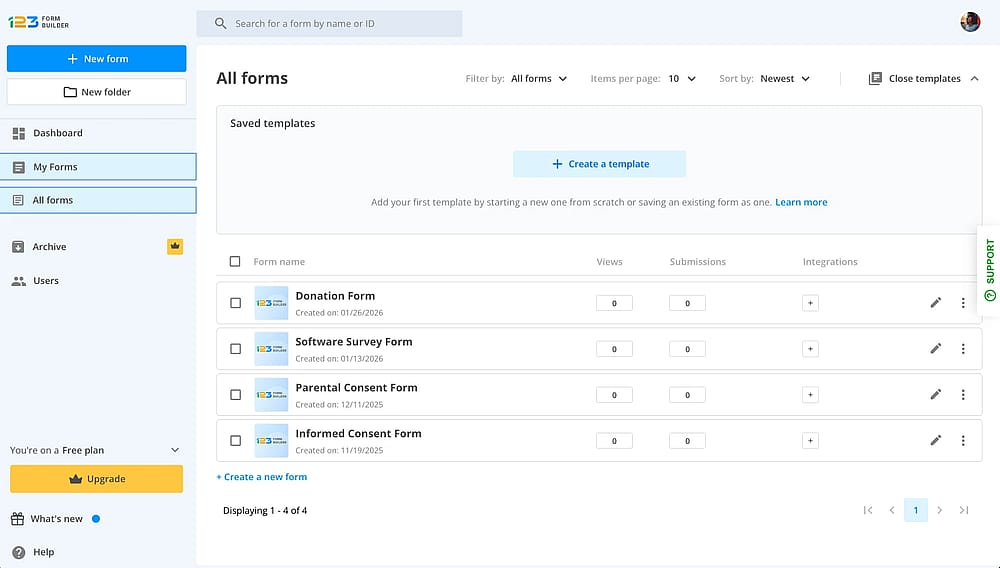
Workspace of 123FormBuilder
123FormBuilder is a veteran form-building platform, built primarily around payment processing and regulatory compliance. It's a strong fit for small businesses, healthcare teams, and organizations that need advanced features like multi-gateway payments and HIPAA compliance. Where tools like Google Forms fall short on compliance and payments, 123FormBuilder is built specifically to fill that gap.
💡 Use case example: A small business can set up a product order form that accepts PayPal, Stripe, or Square in a single workflow, without routing customers to a separate checkout page.
Payment collection in 123FormBuilder is locked behind the Platinum plan or higher. If payments are your main reason for choosing it over alternatives, the free plan and the Gold plan won't get you there.
Head-to-head comparison (7 categories)
From pricing and ease of use to design, integrations, and team collaboration, both Typeform and 123FormBuilder cover the essentials of online form building. The real differences become clearer once you compare them side by side, so here's a closer look at how they perform across the seven categories that matter most:
1. Pricing
If you're comparing Typeform pricing against 123FormBuilder pricing, the first thing to know is that both tools push you toward a paid plan fairly quickly. Typeform's Basic plan costs $39/month and includes 100 responses for 1 user; higher tiers add more responses per month, extra seats, file uploads, and advanced analytics. The Business plan tops out at $129/month. Typeform offers a free plan, but it limits responses to 10 per month.
Individuals | Teams | ||||
Free | Basic | Plus | Business | Talent | Growth Flow |
0 USD/mo | 39 USD/mo | 79 USD/mo | 129 USD/mo | 169 USD/mo | 379 USD/mo |
123FormBuilder's free plan is actually more generous on submissions, 5 forms, and 100 submissions per month, though forms are capped at just 10 fields each. Its paid plans start at $37/month for Gold (5,000 submissions, 250 fields per form), with conditional logic included unlimited on every plan, including Free.
Free | Gold | Platinum | Diamond | Enterprise |
|---|---|---|---|---|
0 USD/mo | 37 USD/mo | 49 USD/mo | 99 USD/mo | Starting from
225 USD/mo / billed yearly |
The 123FormBuilder free tier includes two major roadblocks: forms are strictly capped at just 10 fields each, and there is zero file storage included. If you need to build detailed questionnaires or collect file uploads, you will be forced to upgrade.
2. Ease of use & Form creation
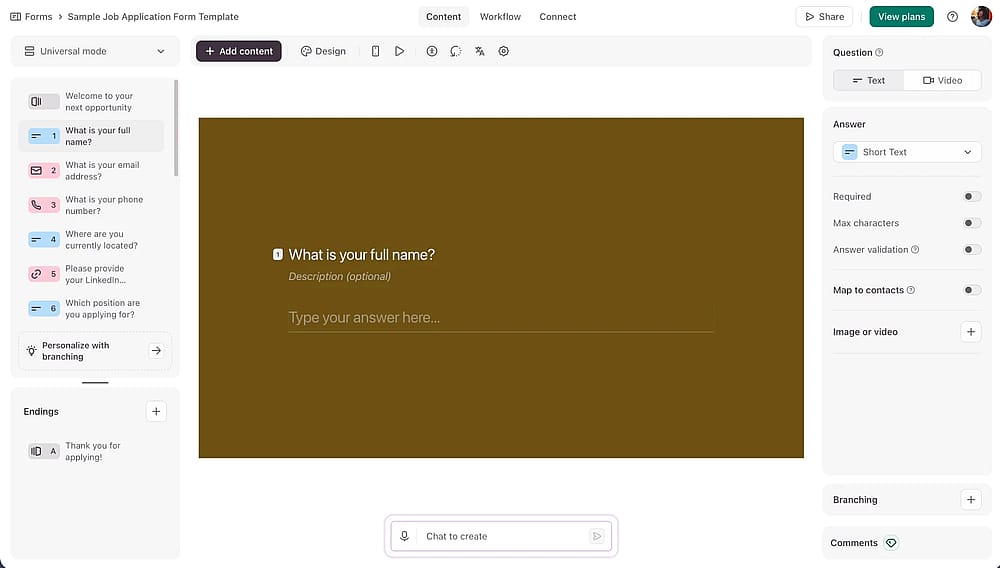
Form builder section of the Typeform tool
Both tools are easy to pick up, but in different ways. Typeform's builder is more polished but more opinionated. It's built around the conversational, one-question-at-a-time format, so working outside that structure takes slightly more effort.
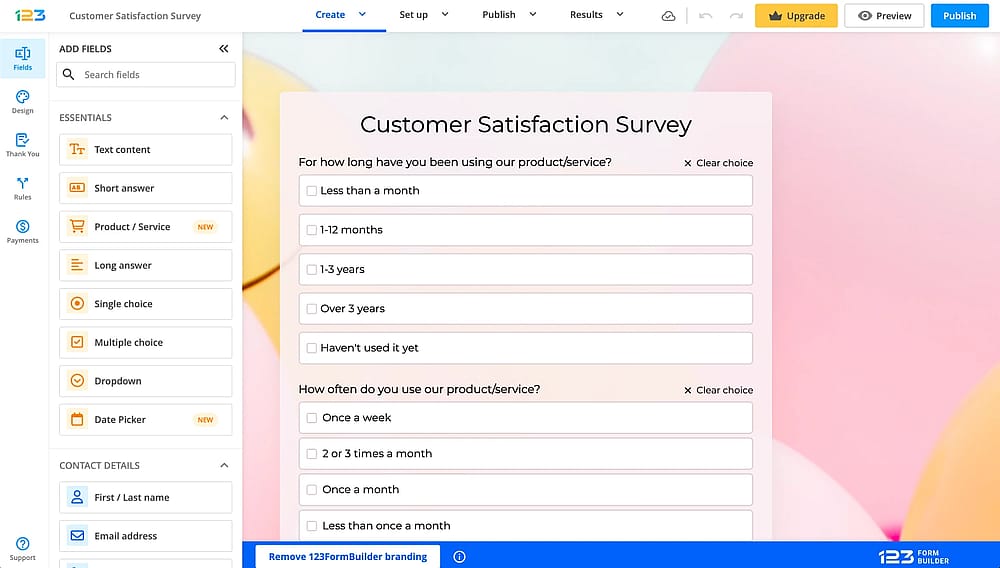
Form builder section of the 123FormBuilder tool
123FormBuilder uses a familiar drag-and-drop builder. Add a form field, place it where you want, and done. No learning curve, and form creation feels instantly intuitive even for first-time users.
💡 Note from our testing: If your primary goal is to get a form live with minimal setup, we found that 123FormBuilder’s editor gets you there the fastest. However, if the respondent experience is your top priority, Typeform’s slightly steeper learning curve pays off quickly.
3. Design & Customization
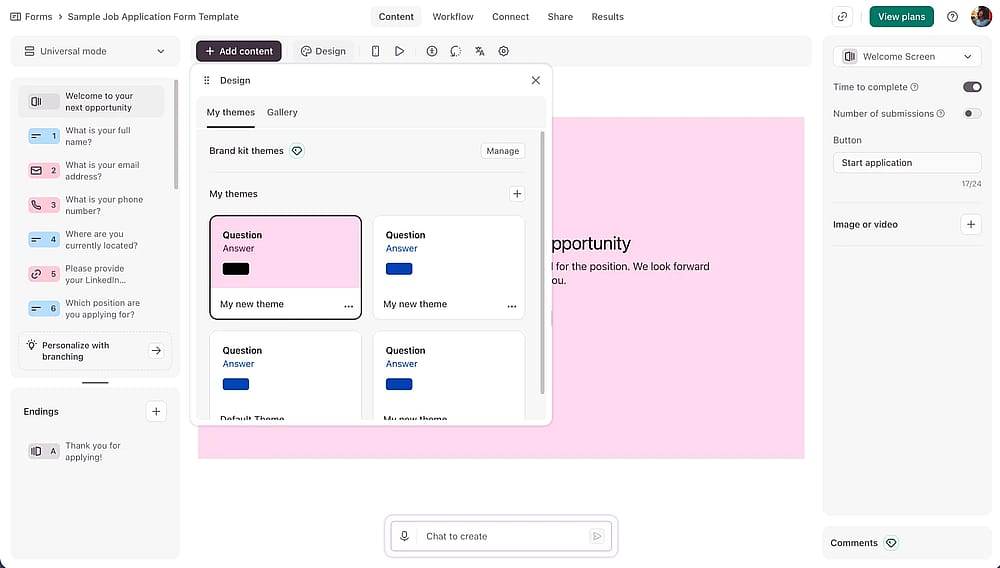
Form designer section of the Typeform tool
Design is where the two tools diverge most. Typeform offers brand kits, custom fonts, animated backgrounds, and a built-in photo library, customization options that let a form genuinely match your brand rather than look generic.
💡 Note from our testing: While building a custom form on Typeform’s free plan, Brand Kits are completely locked out. Additionally, even some design themes from the native theme gallery are locked, forcing you to stick to the most basic styles unless you upgrade.
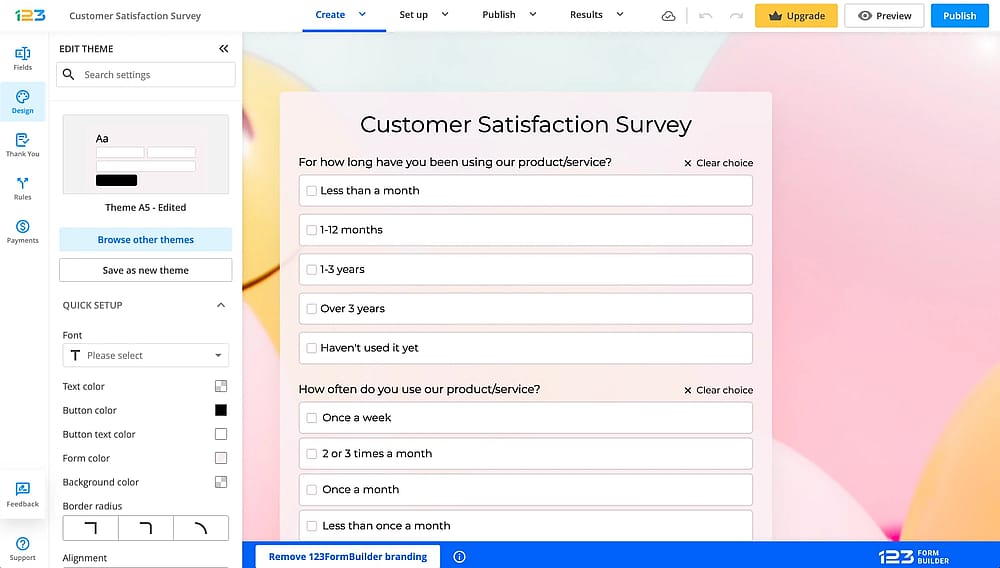
The ‘Design’ section of the 123FormBuilder tool
123FormBuilder's theme editor covers the essentials, colors, fonts, and basic layout tweaks, but it doesn't aim for the same polished feel. It does the job without trying to impress.
4. Field Types & Features
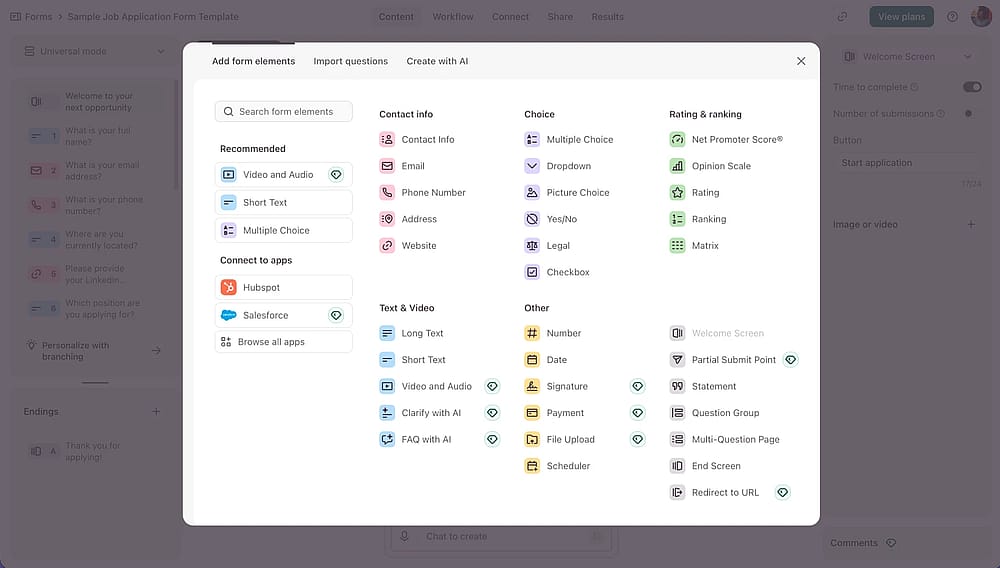
Options of the form fields you can add with Typeform
Typeform offers 20+ field types, including file uploads, payment fields, and rating scales, plus conditional logic, hidden fields, and pre-fill, all built around its conversational layout.
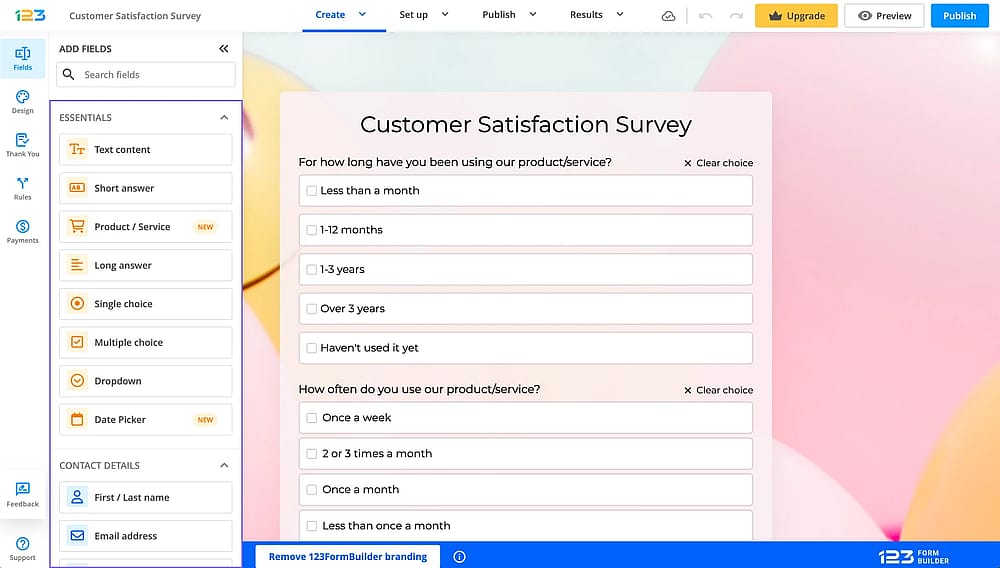
The field menu of the 123FormBuilder tool
123FormBuilder covers 30+ form fields, including digital signatures, formula fields for calculations, and product fields for order forms. Conditional logic is unlimited on every plan, including free.
💡 Note from our testing: While 123FormBuilder gives you great flexibility with free conditional logic, several of its advanced fields are locked on the Free plan. During our hands-on testing, we found that powerful features like file uploads, formula fields for calculations, and field groups are restricted until you upgrade to a higher plan.
5. Analytics & Reporting
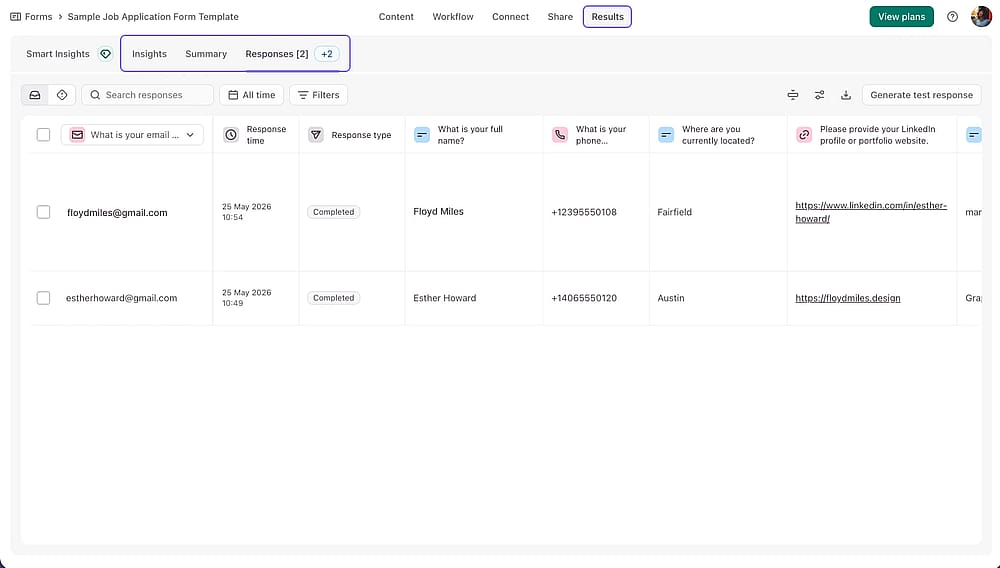
The ‘Results’ section of the Typeform tool
Typeform offers real-time response tracking, per-question drop-off analytics, and AI-powered Smart Insights that surface trends in open-ended answers automatically.
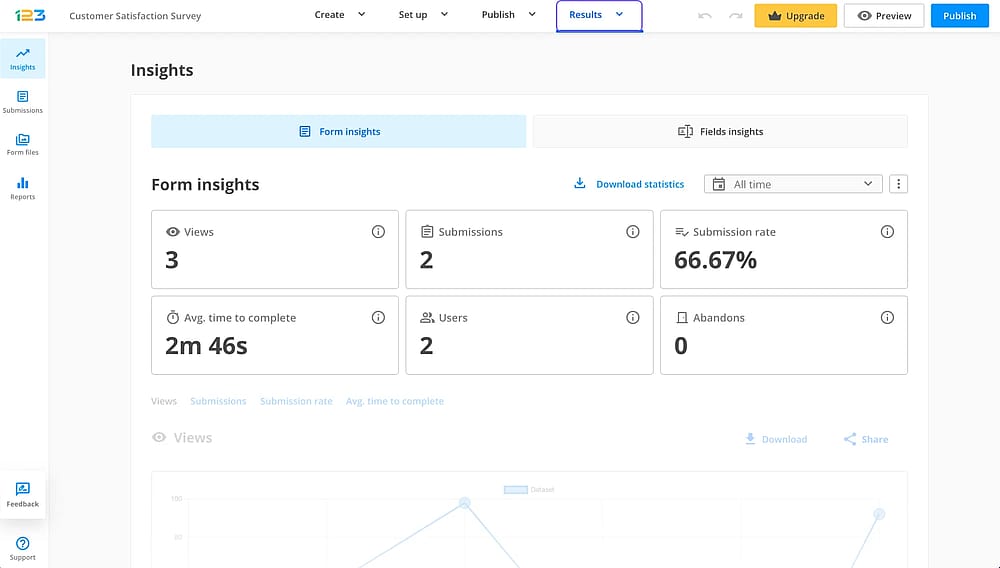
The ‘Results’ section of the 123FormBuilder tool
123FormBuilder's free and Gold plans include basic analytics, views, submissions, submission rate, and average completion time. Advanced analytics (device, referrer, and location data) and custom reports only unlock on Platinum and above.
6. Integrations
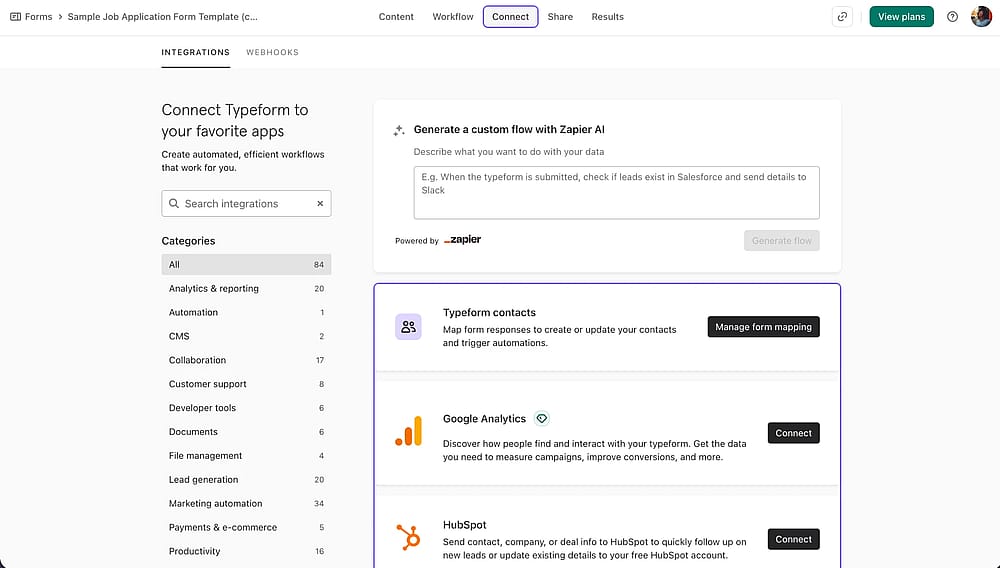
The ‘Connect’ section of the Typeform tool
Typeform connects natively with 120+ tools, including HubSpot, Salesforce, Mailchimp, Slack, and WordPress, a strong fit for marketing-heavy stacks.
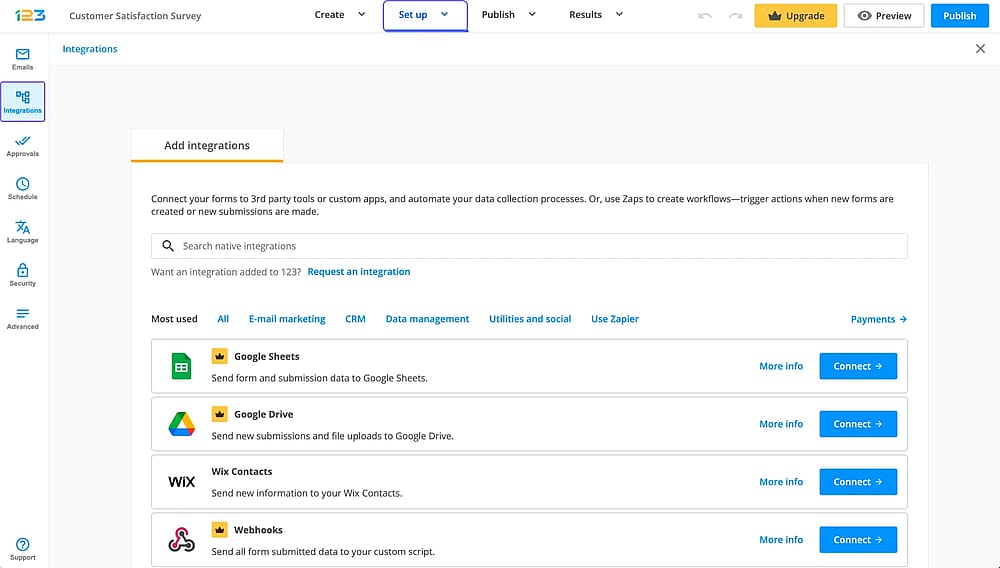
The ‘Integrations’ section of the 123FormBuilder tool
123FormBuilder integrations include 45+ native ones plus Zapier access to 4,000+ apps directly from its settings. CRM integrations with Salesforce and MailChimp are particularly strong, and its real-time Google Sheets and Google Drive can be helpful after you collect data.
On 123FormBuilder's Free plan, only 3 tools are available for connection. Advanced marketing tools like Mailchimp and ActiveCampaign are locked and require a jump to a higher plan.
7. Team collaboration
Typeform gates collaboration by plan: 1 seat on Basic, 3 on Plus, 5 on Business. Adding team members comes at a real cost as you scale.
123FormBuilder allows multi-user collaboration starting on the Gold plan, with individual access levels (Editor/Viewer) for managing who can edit versus just view forms and submissions. The Free plan is single-user only.
💡 Neither tool offers generous free-tier collaboration. If multiple people need to work on forms together without upgrading, this is a limitation on both sides.
An alternative worth trying: forms.app
Typeform and 123FormBuilder both do their core jobs well, but depending on your plan, certain features can come later than you'd expect. If you're looking for a 123FormBuilder alternative with a more generous free plan, or want to avoid pricing Typeform tiers before you're ready to commit, forms.app is worth adding to your shortlist.
1. Team collaboration
forms.app allows unlimited team members on its free plan, which is especially useful for small businesses or growing teams that want multiple people working on forms together without needing to move to a paid tier first.
💡 Use case: A small marketing team can have everyone, from the designer to the copywriter, collaborate on a single campaign form, without anyone needing a separate paid seat.
2. Drop-off tracking & Partial submissions
forms.app shows exactly where respondents stop filling out a form and saves their progress up to that point, so partial responses aren't lost. This data can be reviewed over time to spot which questions tend to cause drop-offs, making it easier to fine-tune a form for better completion rates.
3. AI form tools
The platform includes an AI Form Generator, AI Survey Tool, and AI Quiz Maker, all available on the free plan. For teams that want to start building with AI assistance right away, this removes an extra step that some other tools require a paid plan for.
4. Unlimited responses
forms.app's free plan doesn't cap monthly responses, which can be a helpful option for anyone wanting to run a live form without committing to a paid plan upfront.
Conclusion
Typeform and 123FormBuilder serve different priorities, and that's really the heart of this comparison. Typeform leans into design and a conversational respondent experience, making it a strong option for lead generation and customer surveys. 123FormBuilder leans into compliance and payment flexibility, which makes it a solid fit for healthcare, e-commerce, and operationally focused forms.
Both companies also offer customer support and solid form-building experience, regardless of which tool you choose. If you're still weighing your options, forms.app is a good one to explore alongside them, particularly if team collaboration, AI tools, and responses on a free plan matter for how you work.
Frequently Asked Questions (FAQs)
123FormBuilder offers HIPAA compliance through its Enterprise plan, which involves contacting their sales team directly. It's not included on the Free, Gold, Platinum, or Diamond plans, so it's worth checking which tier fits your compliance needs before choosing a plan.
Typeform supports both Stripe and PayPal, but not within the same payment field. Each payment block has to be connected to either Stripe or PayPal, not both at once.
On paid plans, 123FormBuilder has the edge for team use. Typeform's collaboration is more straightforward but more limited, capping at 5 seats even on its highest standard plan. If neither fits your team size or budget, forms.app allows unlimited team members on its free plan.
Contributors
Researched & written by
forms.app, your free form builder
- Unlimited responses
- Unlimited questions
- Unlimited team members