Save up to 60% on yearly plans and enjoy our biggest offer of the year. Limited time only. 🍂
See pricing

Microsoft Forms pricing 2026: free vs. paid features explained
Summarize with
Is Microsoft Forms actually free, or is it just a gateway to a Microsoft 365 subscription?
When you need to build a event registration or product feedback, Microsoft Forms is one of the first online form builder people reach. However, after using both the free and paid versions for my own projects, I’ve found that the "free" label comes with specific technical ceilings that can stall a professional workflow. I spent time testing the limits of both versions, specifically focusing on response caps, data security, and how the tool handles complex logic, to see where the value actually lies.
In this breakdown, I’ll share what I learned from my testing process so you can decide if the free version is enough for your needs. I’ll also highlight the key differences you’ll encounter with the Microsoft Forms pro pricing and mention another free-form builder that offers advanced features for those who find the Microsoft ecosystem too restrictive.
If you’re in a hurry:
👉 Microsoft 365 user: You already have the "Pro" version; use it for Excel syncing and high response limits.
👉 Standalone researcher: The free version is fine for small tasks, but it hard-caps at 200 responses, which can ruin a public study.
👉 Need more power? If you need e-signatures or custom branding, Microsoft Forms will feel too basic; you'll likely need a specialized alternative.
Microsoft Forms: The field report
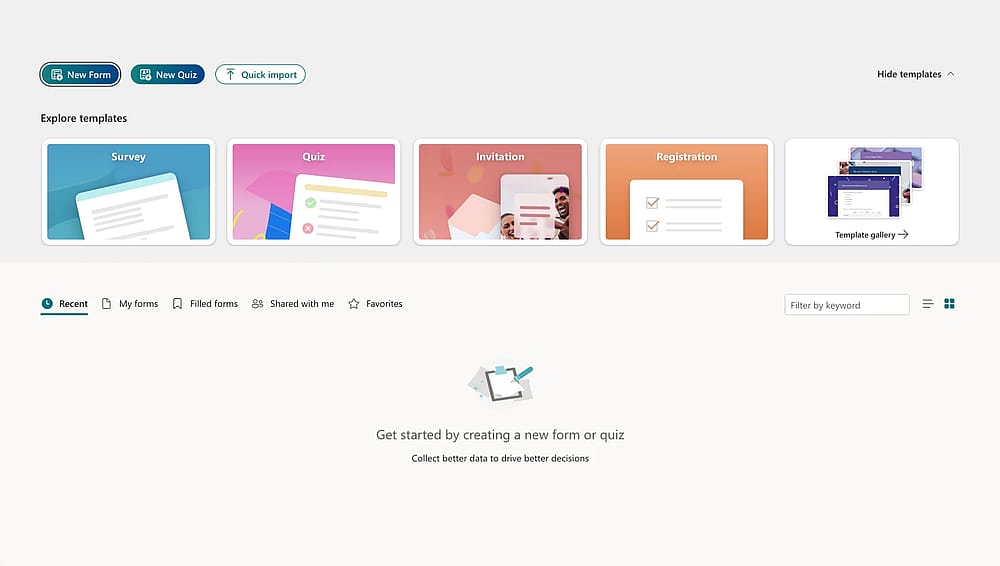
Workspace of MS Forms
Microsoft Forms is a form creation tool that shines for anyone already in the Microsoft ecosystem. After testing it across several projects, here is how the free versus paid experience actually breaks down:
The strengths (what works well)
⬆️ Zero-friction setup: If you have an Outlook or Teams account, you're already signed in.
⬆️ Good integration: Native syncing with Excel and OneDrive makes data management seamless.
⬆️ Mobile-first design: Forms look and perform great on smartphones without any extra tweaking.
⬆️ AI assistance: Paid tiers (starting at $6/user/month) include Copilot to help draft questions and analyze trends instantly.
The trade-offs (where I hit a wall)
⬇️ Hard response caps: The free version is strictly limited to 200 responses; once you hit that, your form shuts down automatically.
⬇️ Minimal branding: You are stuck with basic color themes and a "Microsoft" look; you can't create a truly white-labeled experience.
⬇️ No "save & return": Respondents must finish the form in one sitting, which often leads to higher drop-off rates on longer surveys.
⬇️ Walled garden: There is no native API or third-party integration (like Slack or Zapier) outside of the Microsoft stack.
The verdict: Who is it for?
In my experience, Microsoft Forms is good for internal team polls, customer feedback, or quick classroom quizzes. However, if you need bespoke branding, advanced branching, or high-volume data collection, you will likely find the environment too restrictive and should consider a specialized alternative.
Is Microsoft Forms really free?
To answer the big question “is it really free?” the answer is a technical “yes,” but with strings attached that I only discovered by pushing the tool to Microsoft Forms limitations.
Here is the breakdown of what I found during my testing:
- The "Free" reality: Anyone with a personal Microsoft account (Outlook, Hotmail, Live) can create forms for $0. However, you are strictly capped at 200 responses per form. Once you hit 201, your form stops collecting data until you delete old entries or upgrade.
- The "Paid" power: By upgrading to a Microsoft 365 Personal or Business plan (starting at $6/month), that cap jumps to 2,000 or even 50,000 responses depending on the tier.
- The hidden cost: While the software is free, your data portability isn't. If you want to move your data anywhere outside of Excel or the Microsoft "walled garden" (like to Slack, Trello, or a non-Microsoft CRM), you’ll likely need to pay for a third-party connector or a higher-tier Power Automate license.
Feature | Free (Personal Account) | Paid (M365 Personal) | Paid (M365 Business/Edu) |
|---|---|---|---|
Response Limit | 200 Total | 1,000 Total | Up to 5,000,000 |
File Upload Field | Not Available | Not Available | Included |
Excel Integration | Manual Export | Real-time Sync | Real-time + Power BI |
Collaboration | View-only | View-only | Co-authoring |
AI (Copilot) | None | Basic Drafting | Full Analysis & Drafts |
Branching Logic | Basic (Skip-logic) | Basic (Skip-logic) | Advanced / Dynamic |
forms.app vs. Microsof Forms: Which is better for business?
forms.app solves the specific "walls" users hit within the Microsoft Forms offers, particularly regarding branding, intuitive interface, and complex data collection.
- Advanced logic: Unlike Microsoft’s basic branching, forms.app offers Conditional Logic that allows you to show/hide multiple questions or set complex paths for a personalized user experience.
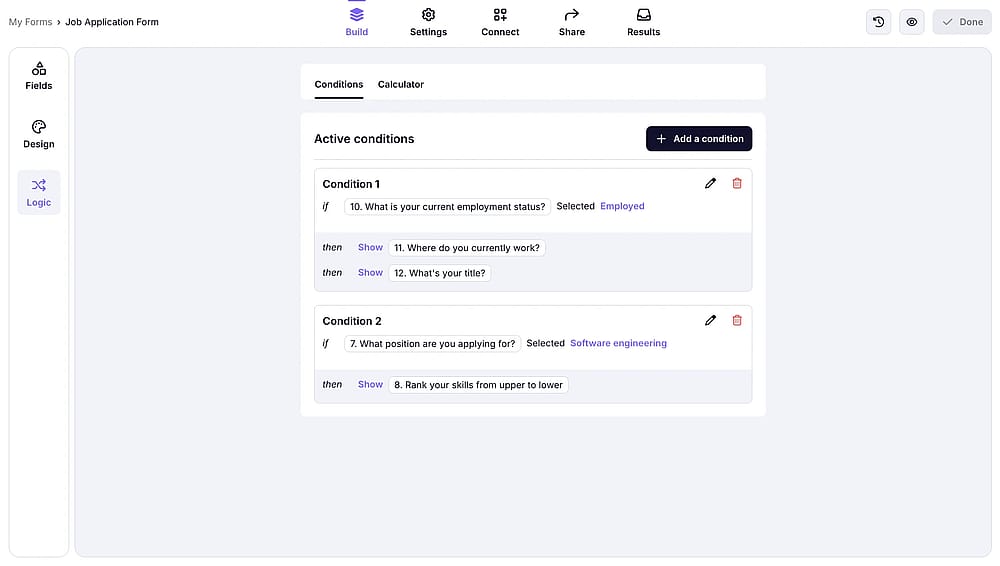
Advanced logic of forms.app
- Design freedom: While Microsoft is visually rigid, the Design tab here allows for full brand control, including custom fonts, border radiuses, and even animated themes.
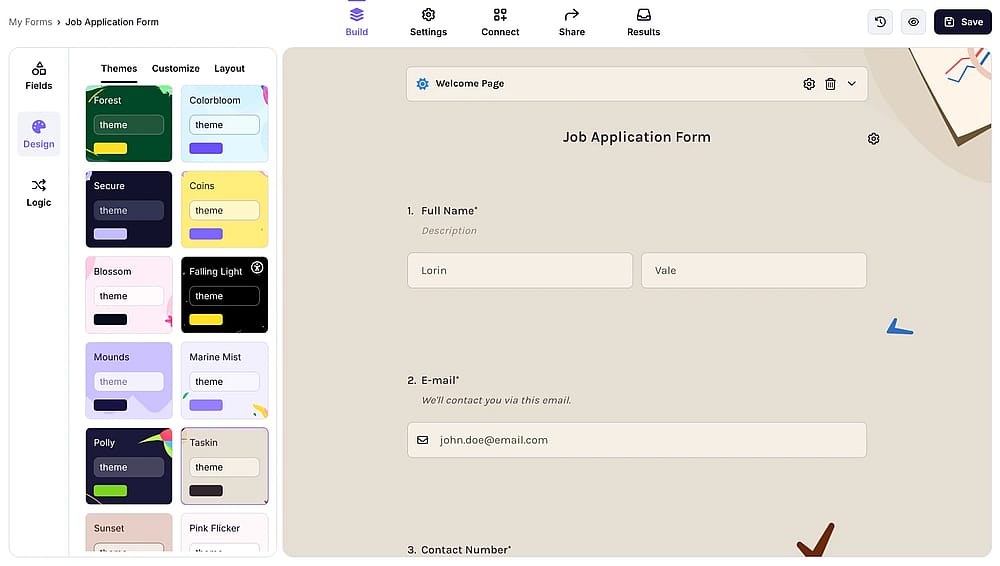
Style your form
- Expanded question types: Apart from basic form fields like multiple choice or single selectinon, you get access to specialized fields, like Payment collection, Signatures, and Timers, that simply don't exist in Microsoft Forms.
- AI-powered building: Using the forms.app AI, you can generate complete, customizable forms from a single prompt and rewrite existing questions instantly using the built-in AI assistant.

Create an instant form with AI
- Seamless integrations: With 500+ integrations (including Slack, Google Sheets, and Zapier), you aren't trapped in the "Microsoft walled garden." Data syncs in real-time to the tools you actually use.
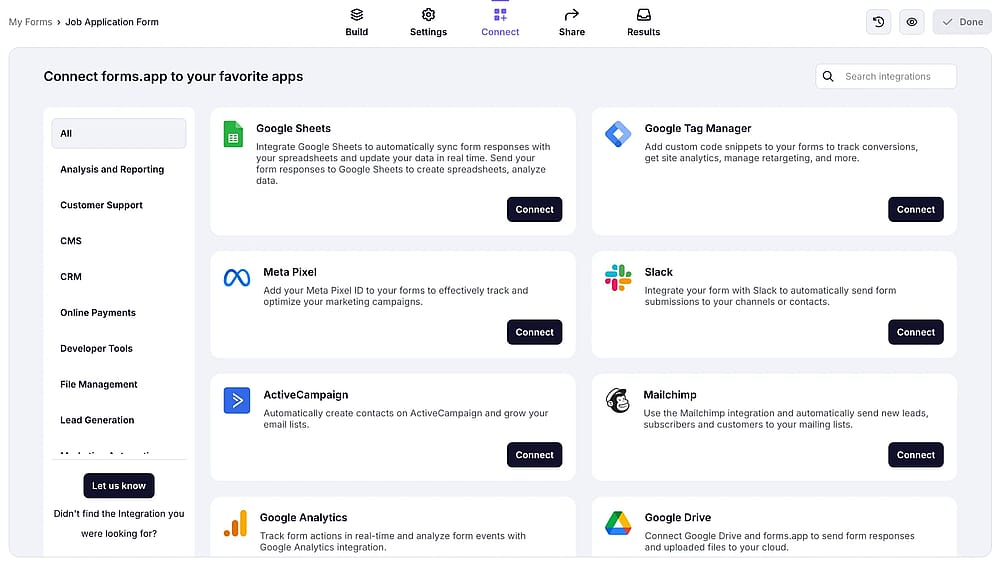
Connect your form to other apps
- Drop-off rates: This feature in the Insights tab. Unlike Microsoft’s basic summaries, this shows exactly which question caused users to quit. By identifying these friction points, I could simplify the form and immediately improve completion rates, a level of data depth Microsoft currently lacks.
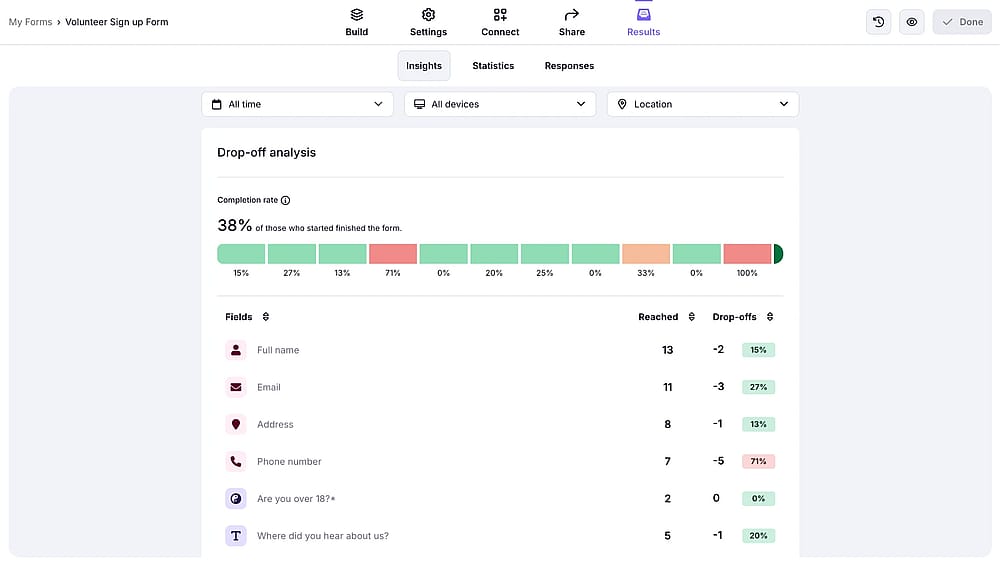
Check the drop-off to imorve data analysis
Final verdict: Which builder should you choose?
After putting both platforms through their paces, the choice comes down to your specific project goals. Microsoft Forms is a reliable, "no-fuss" utility if you are already a 365 customer who need to gather quick internal feedback or simple data. It’s built for speed and ecosystem security, not for high-end design or complex marketing funnels.
However, if your requirements go beyond a basic poll, forms.app is the clear winner for professional flexibility.
Frequently asked questions (FAQs)
No. Unlike forms.app, Microsoft Forms does not have a native payment field for Stripe or PayPal. You would need to use complex workarounds via Power Automate, which often requires a paid license.
Not natively. If you need legally binding signatures, you’ll have to integrate it with third-party tools like DocuSign. Alternatively, a dedicated builder like forms.app offers signature fields directly in its free-tier toolkit.
No. After a user clicks submit, they are stuck on the Microsoft "Thank You" page. You cannot automatically redirect them to your website or a custom landing page. If your marketing funnel requires a redirect, you’ll need an alternative like forms.app, which offers custom "Multiple Endings" and URL redirects.
Contributors
Researched & written by
forms.app, your free form builder
- Unlimited responses
- Unlimited questions
- Unlimited team members