Save up to 60% on yearly plans and enjoy our biggest offer of the year. Limited time only. 🍂
See pricing

How to create a job application form in 2026 (+free templates)
Summarize with
Hiring is only as good as the information you collect. Without a structured way to gather candidate details, HR teams end up comparing resumes that all look different and slowing down the hiring process. This is the gap online job application forms fill, turning scattered resumes into consistent data collection, while shaping candidate experience from the very first interaction.
In this guide, we'll cover what a job application form needs, how to build one step by step using forms.app (one of the most capable form builders available), and how AI can help you go from blank page to a working job application form template in minutes, plus a few practical tips from actually building these forms.
TL;DR:
1. Start from a blank form or a job application form template
2. Add your fields: contact info, file upload, employment history, custom questions
3. Customize the design
4. Set up logic and configure settings
5. Publish and share
Essential fields in a job application form
Not every field belongs in an employment application form; the goal is to collect what actually helps hiring teams decide, without turning the form into a chore. Here are the core form fields to include:
- Contact details: name, phone number, and email addresses so you can reach candidates without delay
- Position selection: a multiple-choice field if you're hiring for more than one role
- Employment history: current or former job info, kept brief
- File upload: for CVs, portfolios, or references
- A custom question: one open-ended field to let candidates express themselves
- How they heard about you: useful for tracking which channels work
💡 With most modern form builders, adding these is a quick drag-and-drop process; no need to build each field from scratch, which helps with saving time during the setup.
Step-by-step: creating your form in forms.app
forms.app is a no-code online form builder that lets you build a job application form with drag-and-drop fields, no technical skills required. Here's how to go from a blank dashboard to a published form in a few short steps.
1. Log in and choose a starting point
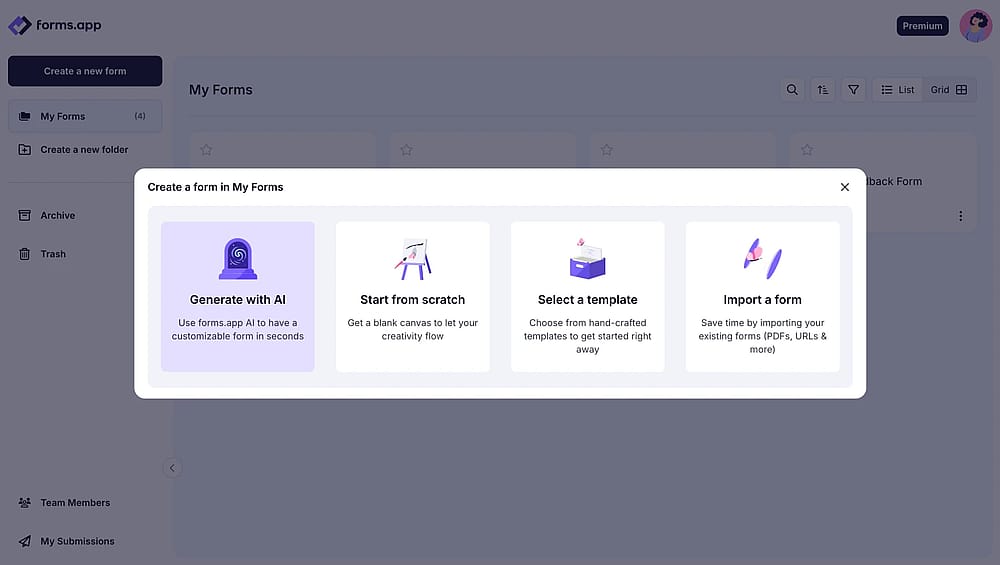
Start creating your form from a blank form, generate with AI, or select a template
Sign up for free or log in with Google, Microsoft, or Apple. From there, pick a ready-made job application form template to save time, start from scratch for full control, or use the AI form generator; just enter a prompt like "job application form for a marketing role" and it drafts the form for you.
2. Add your form fields
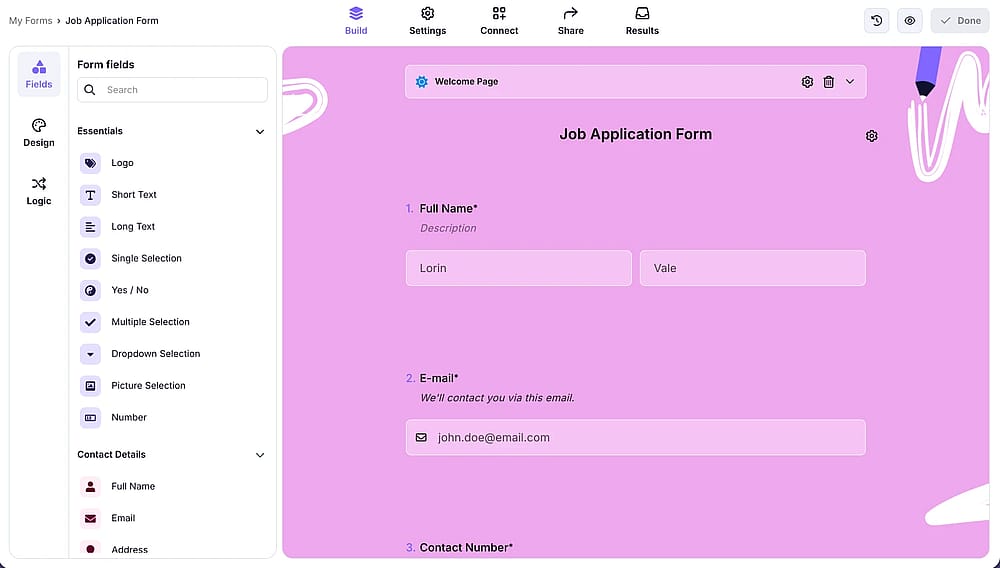
Add the form fields needed or edit the ones that the template provides from the ‘Build’ section
Add contact details, a file upload for CVs, employment history, and any other required information. Drag and drop fields into place, reorder them, or edit each one by clicking the gear icon.
💡 From our tests: Keep the file upload field near the top; candidates are more likely to attach their CV early rather than after several other questions.
3. Customize the design
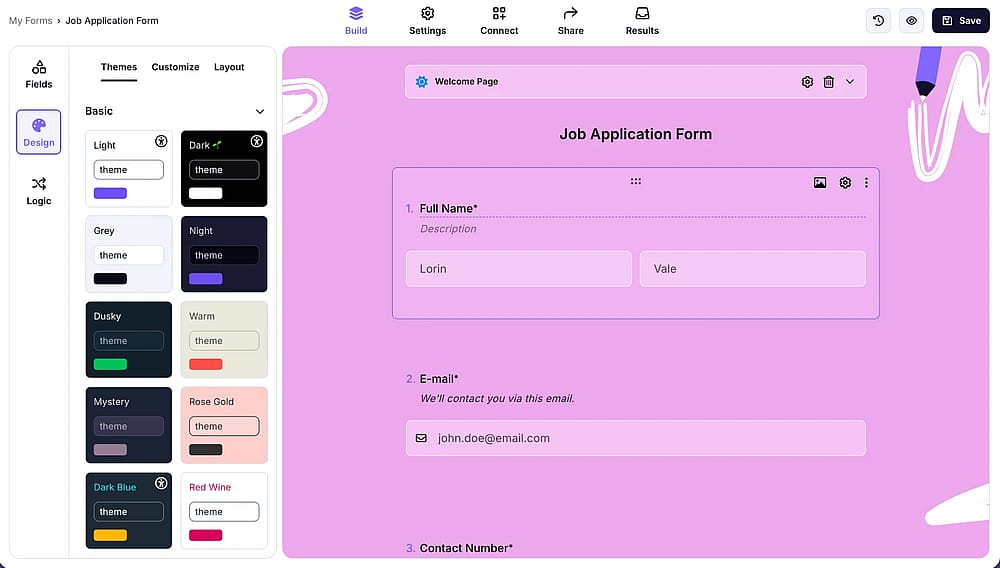
Check the customization options by opening the ‘Design’ tab
Match the form to your brand, add your logo, adjust colors and fonts, or choose from built-in themes. The form automatically stays mobile-friendly, no matter which design you pick.
4. Set up logic and settings
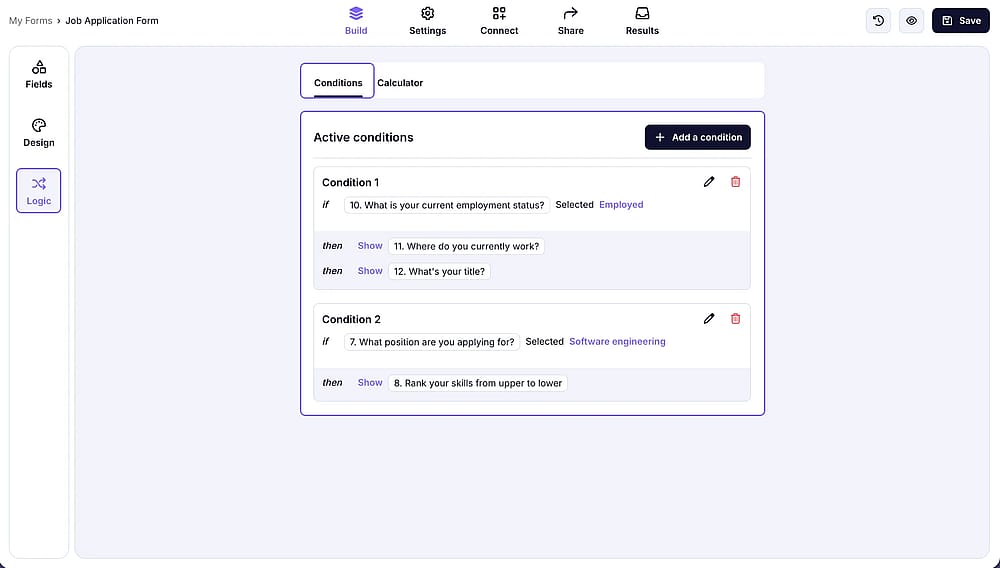
Set up the conditional logic from the ‘Logic’ section and adjust the form settings by going to the ‘Settings’ tab
Use conditional logic to show or hide fields based on earlier answers. In Settings, configure email notifications, and on the Connect tab, edit integrations with tools such as Google Sheets, Slack, or HubSpot.
💡 From our tests: Set up email notifications before you publish; it's easy to forget, and missing the first few applications is a common early mistake.
5. Publish and share
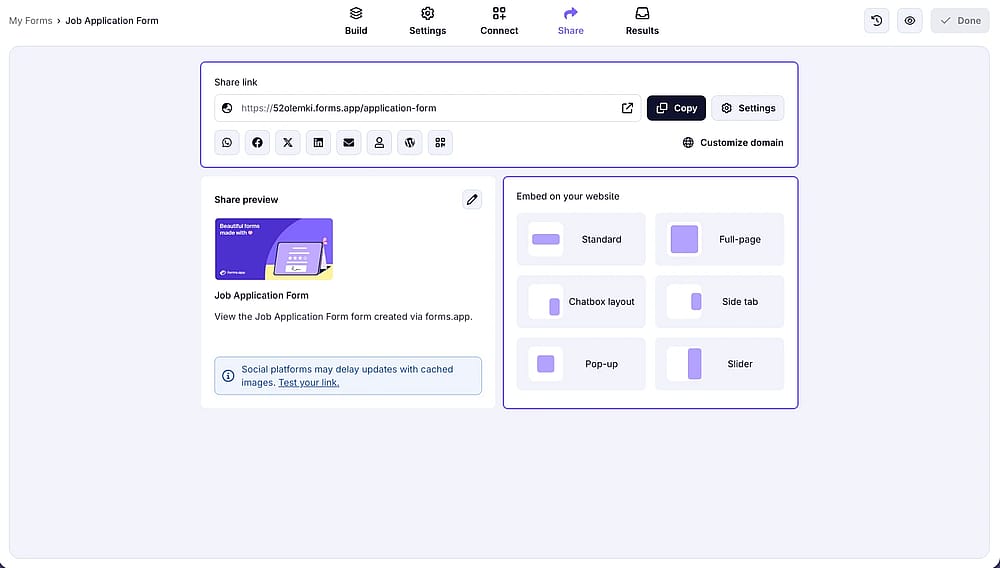
Explore sharing options available and publish your form by accessing the ‘Share’ tab
Share your form via a direct link, embed it on your careers page, or generate a QR code. Once it's live, use the Results tab to track and review submissions as they come in.
💡 From our tests: Test the form yourself before sharing it widely. You can quickly do so by pressing the Eye icon to open Preview mode, which is the fastest way to catch broken fields or confusing wording.
5 tips to create a job application form
A few small choices can make the difference between a form people finish and one they abandon halfway through.
- Keep it short: only ask for what you'll actually use in screening; every extra field is a chance to lose an applicant.
- Make the CV upload optional: some candidates apply from mobile without their file on hand, so don't block submission over it.
💡 With forms.app, you can always change whether a field is required from that field's settings; just check the Required toggle on or off.
- Add one open-ended question: a single free-text field gives you more insight into a candidate than a page of checkboxes.
- Test on mobile before sharing: most applicants will fill it out on their phone, so check that nothing feels cramped or hard to tap.
- Set up notifications early: you don't want to miss the first few applications because alerts weren't configured yet.
Conclusion
A good job application form does more than collect resumes; it standardizes what you know about every candidate, speeds up screening, and shapes how people experience your hiring process. Whether you build it from scratch or let AI draft the first version, the goal is the same: gather the right information without making candidates jump through hoops. With the steps above, you should have everything you need to publish a form that works for both your hiring team and applicants.
Frequently asked questions (FAQs)
Yes, forms.app lets you build and publish a job application form for free, including access to templates and the AI form generator.
Yes, add a file upload field to let candidates attach their CV, portfolio, or references directly with their application.
It is possible to create a job application form for free on Google Forms, too.
You can use Google's built-in job application template or build one from scratch, but it lacks features like AI form generation, drop-off tracking, and advanced design customization that make screening large volumes of applicants easier.
- July 2026 - Article fully revised and updated from start to finish
- July 2026 - Feature list and visuals reviewed and updated
- July 2026 - Additional tests conducted to provide updated personal insights and experiences
- July 2026 - FAQ section added
Contributors
Researched & written by
forms.app, your free form builder
- Unlimited responses
- Unlimited questions
- Unlimited team members