Save up to 60% on yearly plans and enjoy our biggest offer of the year. Limited time only. 🍂
See pricing

10 Best Notion Forms alternatives: 2026 expert review
Summarize with
Notion is an incredible database, but its native forms often feel like a “lite” version of what power users actually need.
To find the best workarounds, our team spent 40+ hours stress-testing different form builders. We didn’t just read the landing pages; we built live lead-capture forms, tested conditional logic branches, and timed how long it took for data to sync back into a Notion workspace.
Whether you’re a solopreneur needing a free solution or a project manager requiring complex API integrations, we’ve narrowed down the field. Below are the 10 Notion form builder alternatives that survived our testing, ranked by their reliability, speed, and depth of integration.
💡 All tools featured in this content have been updated for 2026 (including features and pricing). Monthly payment options are listed for all tools that offer them.
TL;DR Notion Forms alternatives
1. forms.app — Best for teams
2. NoteForms — Best for “update” workflows (editing existing Notion pages)
3. SurveyMonkey — Best for high-volume academic research and deep data analysis
4. Paperform — Best for high-end aesthetic design and visual storytelling
5. Cognito Forms — Best for HIPAA compliance and complex conditional logic
6. Typeform — Best for conversational UX and high-conversion lead generation
7. ProProfs Survey Maker — Best for targeted market research
8. Formstack — Best for enterprise-grade security and cross-platform automation
9. Fillout — Best for advanced relational database syncing and “linked” records
10. Weavely — Best for designers (direct Figma-to-Notion form publishing)
First glance at Notion Forms
Tool | Free Plan | Best Use Case |
forms.app | Fast AI-powered creation | |
NoteForms | Updating existing Notion records | |
SurveyMonkey | ⚠️ | Professional academic research |
Paperform | High-end visual storytelling | |
Cognito Forms | HIPAA & complex calculations | |
Typeform | ⚠️ | Conversational user experience |
ProProfs | ⚠️ | Targeted market research |
Formstack | Enterprise security & e-signatures | |
Fillout | Advanced Notion database syncing | |
Weavely | Figma-to-Notion design control |
*✅ Generous Free Plan: High limits or includes advanced features.
*⚠️ Restricted Free Plan: Very low submission/question limits.
*❌ Trial Only: No permanent free tier available.
About Notion Forms: features & pricing
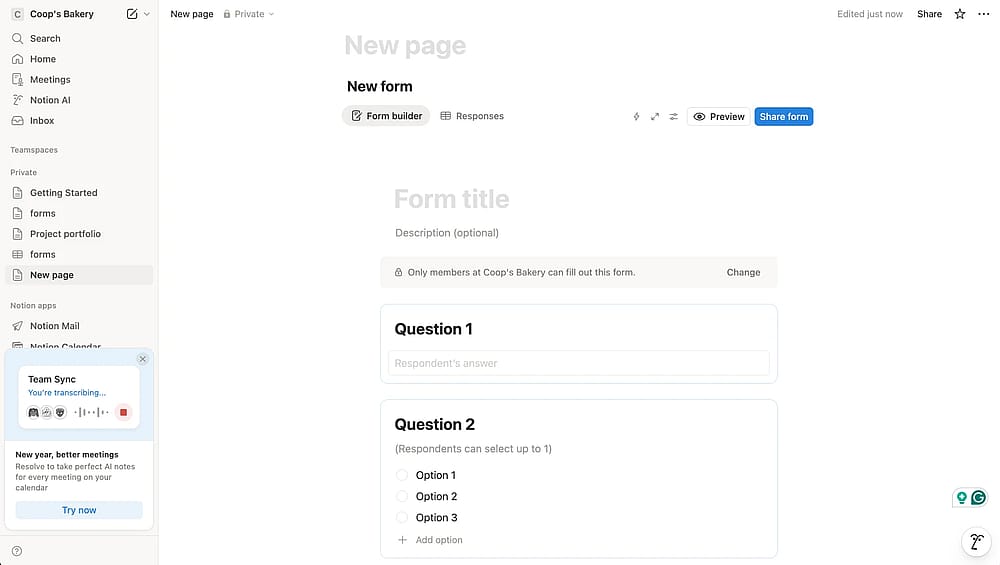
Workspace of Notion Forms
Notion Forms has finally bridged the gap between data storage and data collection. In our 2026 tests, the Instant Database Mapping was the standout feature; since it’s a native view, submissions appear in your database with zero latency, killing the “sync delay” found in third-party integrations.
However, the “native ceiling” is surprisingly low for professional use. While the free tier is generous, Conditional Logic remains a premium feature, and you’ll hit a hard 5MB file upload limit on lower plans. Without native payment processing or “upsert” logic (the ability to update existing records), it’s an elite tool for team check-ins and simple RSVPs, but too restrictive for high-stakes client onboarding or complex external workflows.
Feature | Free | Plus ($12/mo) | Business ($24/mo) |
Forms & Responses | Unlimited | Unlimited | Unlimited |
File Uploads | Max 5MB | Unlimited | Unlimited |
Conditional Logic |
10 Best alternatives to Notion Forms
There are many online form builders available, and Notion Forms is only one of them. If Notion integrations are not enough for you and your team members, here are the best 10 Notion Forms alternatives that we tested for you:
1. forms.app (Best for teams)
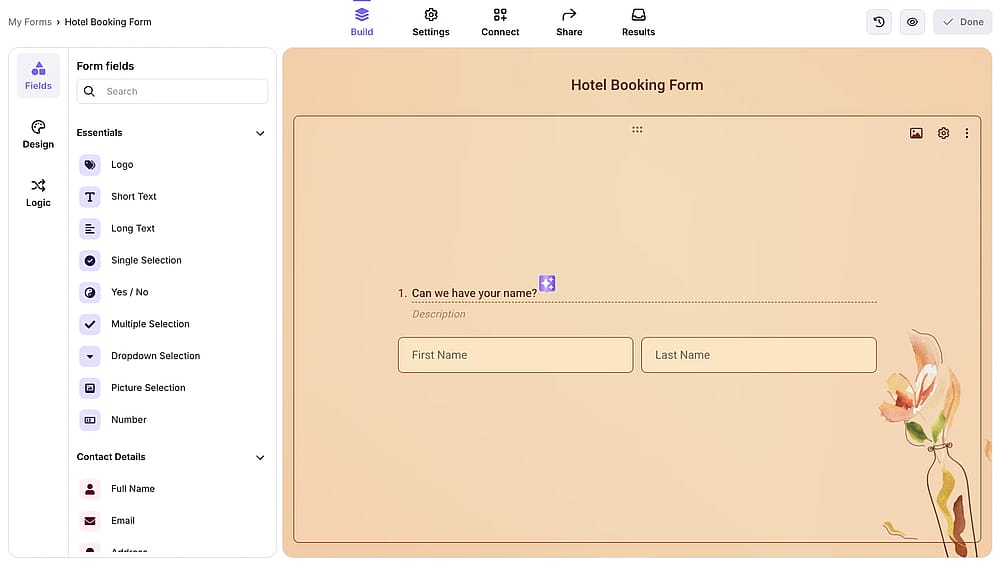
Workspace of forms.app
forms.app is a versatile, mobile-first form builder that prioritizes speed and ease of use. It features a robust AI generator that can build entire forms or surveys from a single text prompt, making it ideal for users who need to go from idea to live URL in seconds.
Why is forms.app a top pick? Unlike Notion's rigid layout, forms.app offers a mobile-responsive, “step-by-step” design that boosts completion rates.forms.app provides free conditional logic, a feature that Notion users must pay $24/month to access.
Key features:
- 500+ seamless integrations
- Unlimited responses and seats on the free plan
- Real-time push notifications for mobile
- Advanced calculator for automated scoring
- Multilingual forms
forms.app pricing:
- Free plan: ✅
- Basic plan: $29 / mo
- Pro plan: $39 / mo
- Premium plan: $79 / mo
2. NoteForms (Best for “update” workflows)
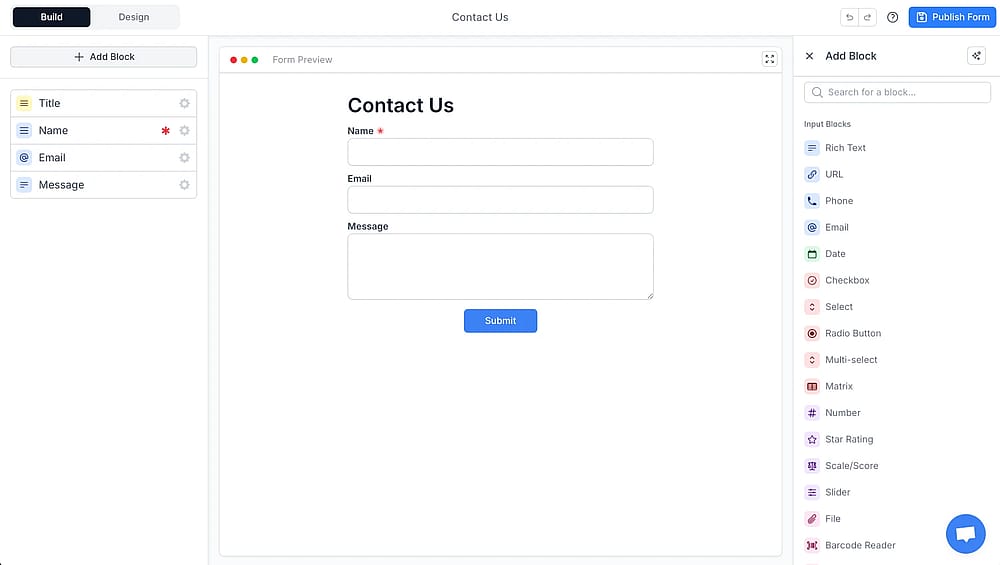
Workspace of NoteForms
NoteForms is a form builder that integrates with Notion, acting as a powerful extension rather than a separate tool. It is widely recognized for its “Login” feature, which allows external users to securely access and edit their specific Notion data.
Why is NoteForms a top pick? While forms is Notion only allow for new data entry, NoteForms enables “Update” workflows, letting users modify existing database records. This makes it a superior choice for building client portals, member directories, or inventory management systems without exposing your backend.
✍️ Editor’s experience: We loved the “update” workflow for client portals; however, the UI feels a bit dated compared to modern conversational builders.
Key features:
- Edit existing Notion database records
- User login and authentication portals
- Signature field support for basic contracts
- Automated email responders for submissions
NoteForms pricing:
- Free plan: ✅
- Pro: $24 / mo
- Team: $59 / mo
3. SurveyMonkey (Best for high-volume academic research)
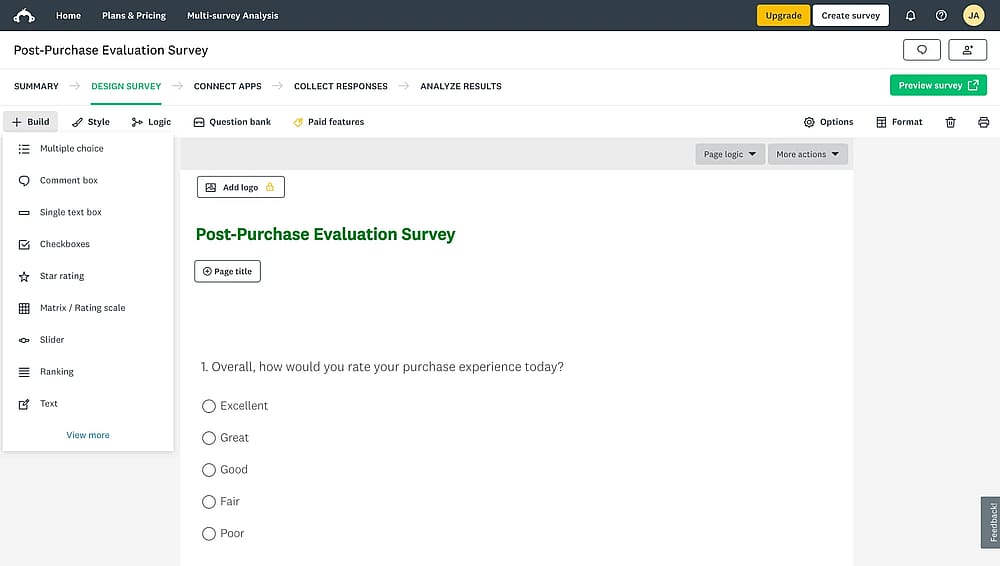
Workspace of SurveyMonkey
SurveyMonkey is the industry veteran for professional-grade data collection and analysis. It excels in complex research environments where data integrity, statistical significance, and longitudinal tracking are the primary goals.
Why is SurveyMonkey a top pick? Notion lacks the analytical “brain” required for serious research; SurveyMonkey fills this gap with expert-certified templates and automated sentiment analysis. It handles massive response volumes that would typically slow down or clutter a standard Notion database view.
Key features:
- Expert-vetted survey template library
- AI-driven sentiment and text analysis
- Benchmarking against industry standards
- Advanced skip logic and branching
- Multi-channel distribution (Email, SMS, Web)
SurveyMonkey pricing:
- Free plan: ✅
- Team Advantage: $30 / mo / user
- Team Premier: $92 / mo / user
- Premier Annual: $139 / mo
- Advantage Annual: $39 / mo
- Standard Monthly: $99 / mo
4. Paperform (Best for high-end aesthetic design)
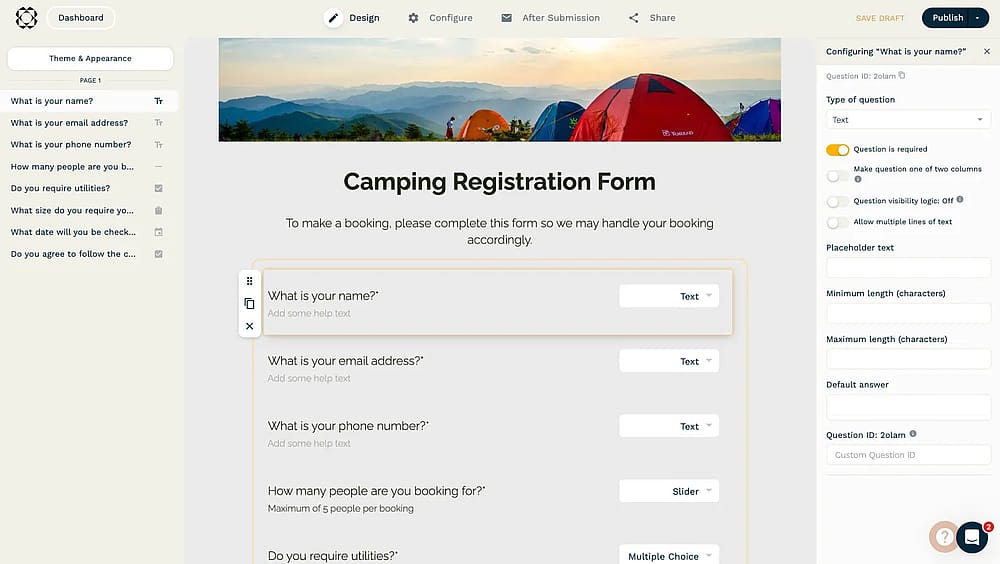
Workspace of Paperform
Paperform combines the power of form creation with the visual flexibility of a landing page creator. It uses a unique “doc-style” editor that allows you to insert images, videos, and styled text anywhere on the page.
Why is Paperform a top pick? If Notion Forms feels too “corporate” or “gray,” Paperform is the solution. It offers total brand control, allowing you to create high-converting, beautiful lead capture pages that look like custom-coded websites rather than just another standard form.
✍️ Editor’s experience: Building landing-page style forms is a joy, but the sheer amount of styling options can lead to “customization fatigue.”
Key features:
- Complex mathematical calculations and logic
- Full custom CSS and media embedding
- Direct e-commerce and inventory management
Paperform pricing:
- Free plan: ❌ (only free trial)
- Essentials: $29 / mo
- Pro: $59 / mo
- Business: $159 / mo
5. Cognito Forms (Best for HIPAA compliance and complex logic)
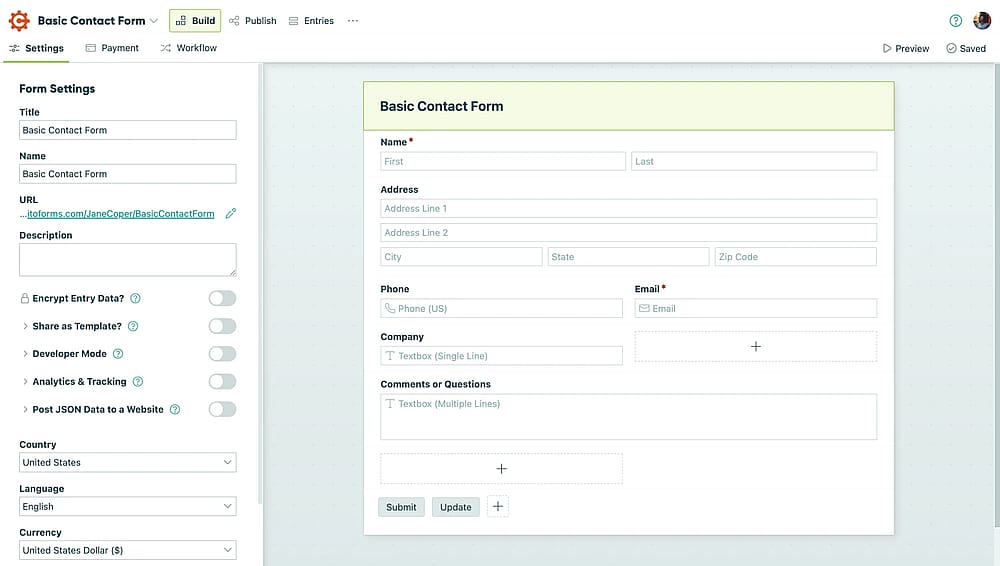
Workspace of Cognito Forms
Cognito Forms is a powerhouse for organizations that require secure, logic-heavy workflows. It is one of the few builders that offers HIPAA compliance at an accessible price point, making it a staple for healthcare and legal sectors.
Why is Cognito Forms a top pick? Cognito Forms handles “repeating sections” and complex nested logic that Notion’s basic conditional features cannot touch. It is far more robust for internal business processes like expense reports or medical intake forms requiring secure document generation.
Key features:
- HIPAA and GDPR compliance security
- Repeating sections for list-based data
- Save-and-resume functionality for long forms
- Lookup fields to pull data between forms
Cognito Forms pricing:
- Free plan: ✅
- Pro plan: $19 / mo
- Team plan: $35 / mo
- Enterprise plan: $129 / mo
6. Typeform (Best for conversational UX)
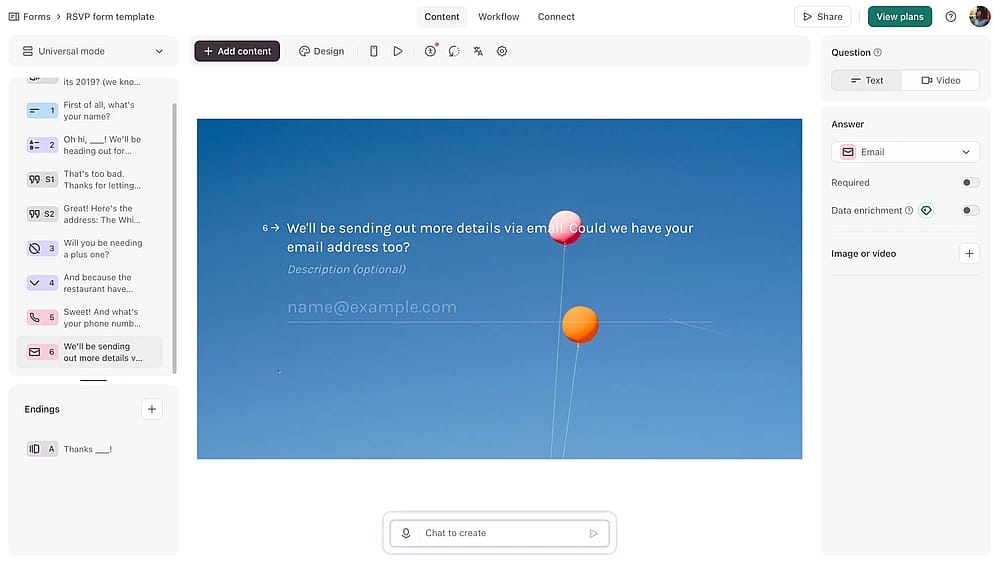
Workspace of Typeform
Typeform is known in the industry for its “one question at a time” interface, designed to feel like a natural conversation. It remains the market leader for user engagement and high-end brand experiences.
Why is Typeform a top pick? Notion Forms are static and can feel overwhelming if they have many fields. Typeform’s conversational flow significantly reduces “form fatigue,” leading to much higher completion rates for lead generation and customer feedback forms than a standard database-entry form.
Key features:
- Conversational, interactive user interface
- Video-ask integration for face-to-face forms
- Smart “Logic Jumps” for personalized paths
- Deep integration with CRM and Marketing stacks
- Built-in conversion and drop-off analytics
Typeform pricing:
- Free plan: ✅
- Basic: $29 / mo
- Plus plan: $59 / mo
- Business plan: $99 / mo
- Growth essentials: $166 / mo
- Growth pro: $291 / mo
7. ProProfs Survey Maker (Best for targeted market research)
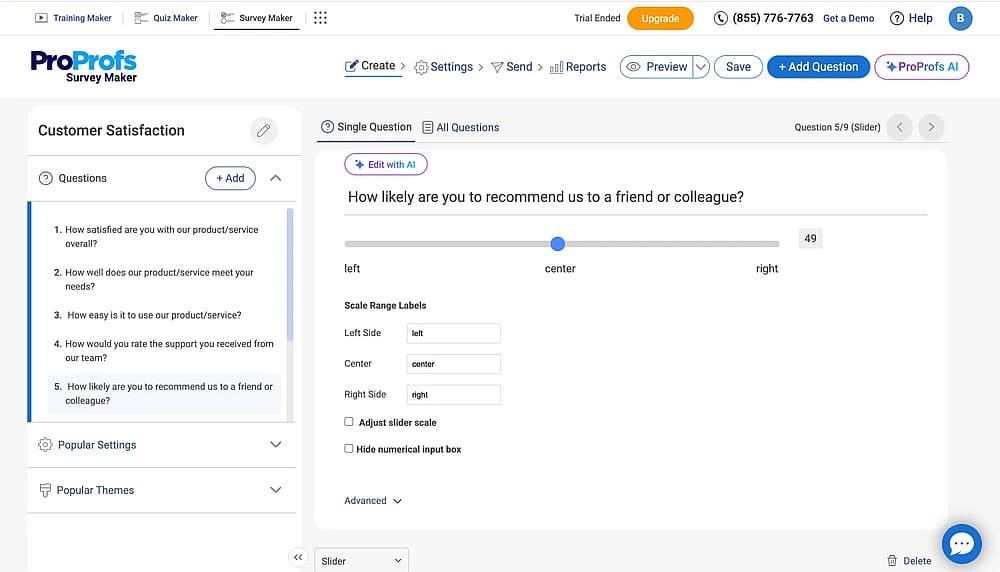
Workspace of ProProfs Survey Maker
ProProfs Survey Maker is built for deep audience insights, offering a massive library of professionally designed templates and question types. It excels at capturing sentiment across multiple channels, from sidebar pop-ups on your website to direct email surveys that sync back to your Notion database.
Why is ProProfs Survey Maker a top pick? Notion is a passive data collector, but ProProfs is proactive. It offers advanced features like Net Promoter Score (NPS) tracking and "sidebar" forms that Notion simply cannot replicate. Our tests found it superior for businesses needing to measure customer satisfaction trends with pre-built, expert-vetted questions.
Key features:
- Native Net Promoter Score (NPS) tracking
- Website overlay and sidebar survey options
- Advanced skip logic and response tagging
- Presentation-ready visual reporting dashboards
ProProfs Survey Maker pricing
- Free plan: ✅
- Essentials: $39.99 / mo
- Business: $59.99 / mo
- Enterprise: $199.99 / mo
8. Formstack (Best for enterprise-grade security)
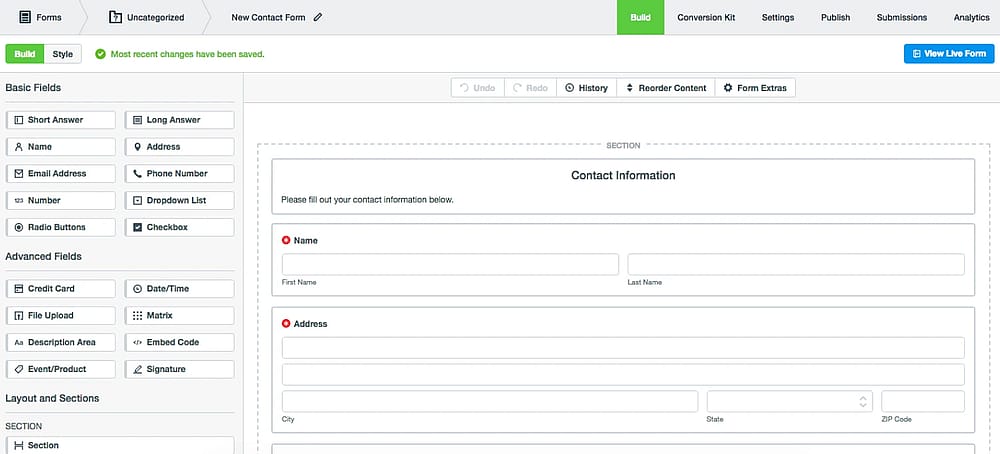
Workspace of Formstack (Source: Formstack)
Formstack is an all-in-one productivity suite designed for large organizations. It bridges the gap between form collection, document automation, and digital signatures within a single, highly secure environment.
Why is Formstack a top pick? For enterprises, Notion's lack of native e-signatures and SOC 2 Type II compliance in forms is a dealbreaker. Formstack provides a legally binding workflow that handles everything from the initial data capture to the final signed contract.
Key features:
- Legally binding e-signatures (Formstack Sign)
- Automated document merging and routing
- Enterprise-level security and access controls
- Offline data collection via mobile app
- Advanced workflow approvals and logic
9. Fillout (Best for advanced relational database syncing)
Fillout is known for its advanced relational database syncing and rich form fields. It was designed specifically to handle the complexities of Notion’s database structure, including relations, rollups, and multi-select fields.
Why is Fillout a top pick? Fillout is the only tool that allows users to pick from “Linked Records” within the form itself. It supports "upsert" logic (updating existing rows) and offers a native scheduling field, making it vastly more powerful for CRM management than Notion's basic forms.
Key features:
- Direct mapping to Notion “Relation” fields
- Integrated scheduling and calendar booking
- Multi-page forms with progress bars
- Formula-based fields and live calculations
Fillout pricing:
- Free plan: ✅
- Starter: $19 / mo
- Pro: $49 / mo
- Business: $89 / mo
10. Weavely (Best for designers)
Weavely is a unique “Figma-to-form” builder that allows designers to create forms directly inside Figma and publish them to Notion. It treats the form as a design asset rather than just a data-capture tool.
Why is Weavely a top pick? While Notion Forms offers almost zero layout customization options, Weavely gives you 100% design freedom. You can build completely custom, pixel-perfect layouts in Figma and sync the results to your Notion database without writing a single line of code.
Key features:
- Direct Figma plugin integration
- Pixel-perfect design and layout control
- Native Notion, HubSpot, and Sheets syncing
- Unlimited forms and responses on free tier
Weavely pricing:
- Free plan: ✅
- Pro monthly: $20 / mo
- Pro yearly: $180 / mo
Conclusion: Our 2026 expert recommendation
While Notion’s native forms are the fastest “zero-setup” choice for internal tasks, they often lack the muscle needed for high-impact business operations.
Based on our 2026 weighted criteria (AI Speed, Logic Access, and “True Free” Value), forms.app is our top pick. It stands out by offering advanced features like conditional logic and payment collection on its most accessible tiers, paired with an AI generator that builds entire forms in seconds. It is the best-value choice for those needing a professional upgrade without the steep price tag of enterprise tools.
The runner-up for complex Notion database syncing is Fillout, while Typeform remains the winner for premium conversational design.
Ready to level up? Which of these alternatives will you try first to supercharge your Notion workspace?
Frequently asked questions (FAQs)
Yes. If you stay within Notion’s free or Plus plans, you are capped at 5MB per file. Using a third-party tool like forms.app or Paperform allows you to host files on their servers first. They then send a secure download link to your Notion database, effectively bypassing Notion’s internal file size restrictions.
Native Notion forms currently do not support payment processing. If you need to sell products or collect registration fees, you must use an alternative like forms.app or Fillout. These tools allow you to embed Stripe or PayPal directly into the form and can be configured to only create a Notion database entry once the payment is successfully processed.
No. Most of these alternatives connect via the official Notion API, which is available on all plans, including the Free tier. However, keep in mind that the form builder itself may have its own form submission limits or premium paywalls for advanced features like custom branding or conditional logic.
Contributors
Researched & written by
forms.app, your free form builder
- Unlimited responses
- Unlimited questions
- Unlimited team members


-cover.png)
.png)